tMysqlColumnList
names.
tMysqlColumnList Standard properties
These properties are used to configure tMysqlColumnList running in the Standard Job framework.
The Standard
tMysqlColumnList component belongs to the Databases family.
The component in this framework is generally available.
Basic settings
|
Component list |
Select the tMysqlConnection |
|
Table name |
Enter the name of the table. |
Advanced settings
|
tStatCatcher Statistics |
Select this check box to collect log data at the component level. |
Global Variables
|
Global Variables |
COLUMN_NAME: the name of the column currently iterated
DATA_TYPE: the data type of the column currently iterated
COLUMN_DEFAULT: the default value of the column currently
IS_NULLABLE: nullability of the column currently
COLUMN_KEY: the key indicator of the column currently
CHARACTER_MAXIMUM_LENGTH: the maximum length in number of
NUMERIC_PRECISION: the data precision of the column
NUMERIC_SCALE: the scale in digits allowed in the column
NB_COLUMN: the number of columns iterated upon so far.
ERROR_MESSAGE: the error message generated by the A Flow variable functions during the execution of a component while an After variable To fill up a field or expression with a variable, press Ctrl + For further information about variables, see |
Usage
|
Usage rule |
This component is to be used along with Mysql components, |
|
Dynamic settings |
Click the [+] button to add a Once a dynamic parameter is defined, the Component List box in the Basic For examples on using dynamic parameters, see Scenario: Reading data from databases through context-based dynamic connections and Scenario: Reading data from different MySQL databases using dynamically loaded connection parameters. For more information on Dynamic |
Scenario: Iterating on a DB table and listing its column names
The following Java scenario creates a five-component job that iterates on a given
table name from a Mysql database using a Where clause and lists all column names present
in the table.
-
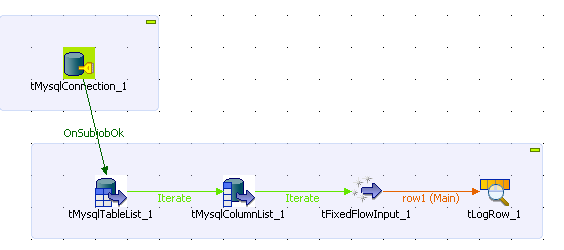
Drop the following components from the Palette onto the design workspace: tMysqlConnection, tMysqlTableList, tMysqlColumnList, tFixedFlowInput, and tLogRow.
-
Connect tMysqlConnection to tMysqlTableList using an OnSubjobOk link.
-
Connect tMysqlTableList, tMysqlColumnList, and tFixedFlowInput using Iterate
links. -
Connect tFixedFlowInput to tLogRow using a Row
Main link.
-
In the design workspace, select tMysqlConnection and click the Component tab to define its basic settings.
-
In the Basic settings view, set the database
connection details manually or select them from the context variable list,
through a Ctrl+Space click in the corresponding
field if you have stored them locally as Metadata DB connection entries.
For more information about Metadata, see
Talend Studio
User Guide.
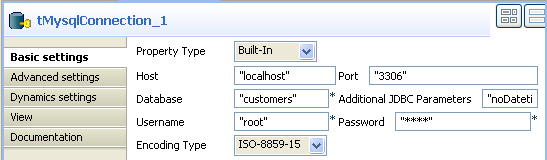
In this example, we want to connect to a Mysql database called
customers.
-
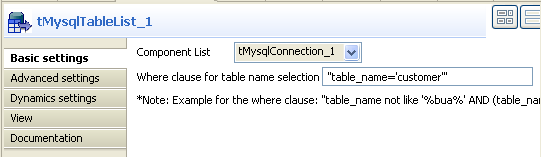
In the design workspace, select tMysqlTableList and click the Component tab to define its basic settings.
-
On the Component list, select the relevant
Mysql connection component if more than one connection is used. -
Enter a Where clause using the right syntax in the corresponding field to
iterate on the table name(s) you want to list on the console.In this scenario, the table we want to iterate on is called
customer. -
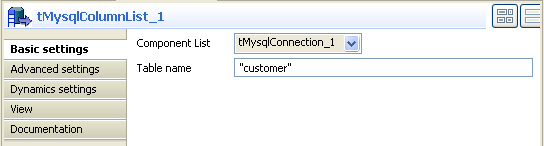
In the design workspace, select tMysqlColumnList and click the Component tab to define its basic settings.
-
On the Component list, select the relevant
Mysql connection component if more than one connection is used. -
In the Table name field, enter the name of
the DB table you want to list its column names.In this scenario, we want to list the columns present in the DB table called
customer. -
In the design workspace, select tFixedFlowInput and click the Component tab to define its basic settings.
-
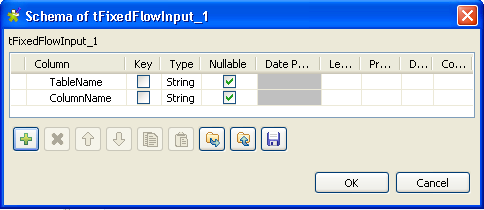
Set the Schema to Built-In and click the three-dot […] button next to Edit Schema to define the data you want to use as
input. In this scenario, the schema is made of two columns, the first for the
table name and the second for the column name.
-
Click OK to close the dialog box, and accept
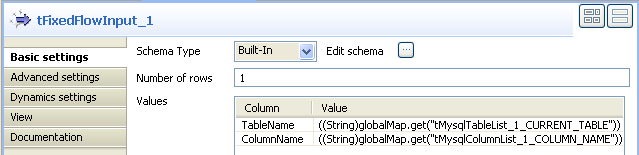
propagating the changes when prompted by the system. The defined columns display
in the Values panel of the Basic settings view. -
Click in the Value cell for each of the two
defined columns and press Ctrl+Space to access
the global variable list. -
From the global variable list, select
((String)globalMap.get(“tMysqlTableList_1_CURRENT_TABLE”))
and
((String)globalMap.get(“tMysqlColumnList_1_COLUMN_NAME”))
for the TableName and ColumnName
respectively.
-
In the design workspace, select tLogRow.
-
Click the Component tab and define the basic
settings for tLogRow as needed. -
Save your job and press F6 to execute
it.

The name of the DB table is displayed on the console along with all its column
names.