Aggregating and calculating output data
-
Double-click the first tAggregateRow to
display its Basic settings view and define
the component properties.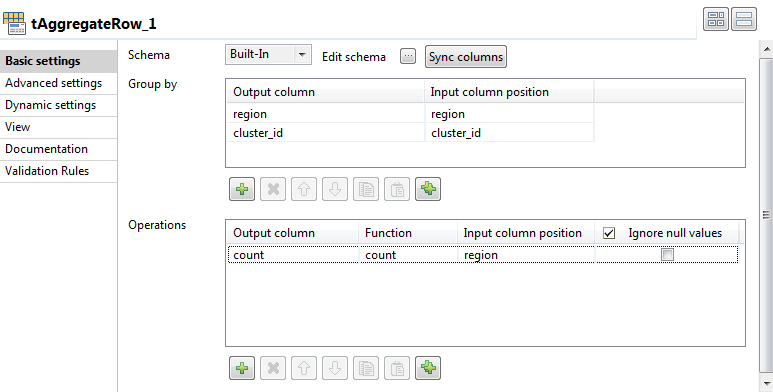
-
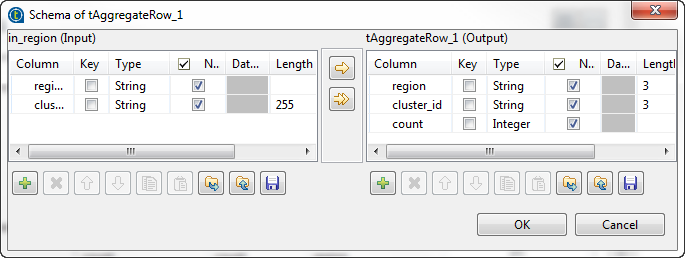
Click the […] button next to Edit schema and define the output flow.
-
Move the columns in the input schema to the output schema and then use the
[+] button to add a new column in the
output schema. Call it count.When done, click OK to close the dialog
box. -
In the Group by section, click the plus
button to add an many lines as needed. Here you can define the group-by
values.-
Click in the first Output column
row and select the output column that will hold the aggregated data,
the region column in this example. -
Click in the first Input column
position row and select the input column from which
you want to collect the values to be aggregated, the
region column in this example.
-
-
In the Operations section, click the plus
button to add rows for the columns that will hold the aggregated data. Here
you can define the calculation values.-
Click in the Output column row
and select the destination column from the list, the
count column in this example. -
Click in the Function column row
and select any of the listed operations.In this example, we want to count the number of clients, based on
their regions, to be listed only once in the output column. -
Click in the Input column
position row and select the input column from which
you want to collect the values to be aggregated, the
region column in this example.
-
-
Double-click the second tAggregateRow
component and define, the same way, its basic settings to count the number
of clients in the second cluster based on the channel
column.