Configuring a Neo4j database connection
-
Double-click the tNeo4jConnection
component to open its Basic settings view
on the Component tab.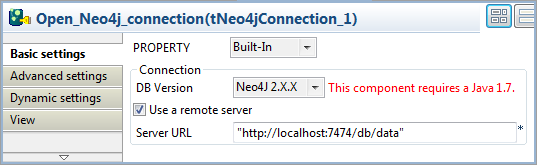
-
From the DB Version list, select Neo4J
2.X.X. -
Select the Use a remote server check box
and specify the URL of the Neo4j server in the Server
URL field, “http://localhost:7474/db/data” in this example.In this example, you will use Neo4j in REST mode; to connect to a remote
Neo4j server in embedded mode, clear the Use a remote
server check box and specify the Neo4j data file directory in
the Database path field.
Document get from Talend https://help.talend.com
Thank you for watching.
Subscribe
Login
0 Comments