Configuring a Neo4j database connection and nodes creation
-
Double-click the tNeo4jConnection
component to open its Basic settings view
on the Component tab.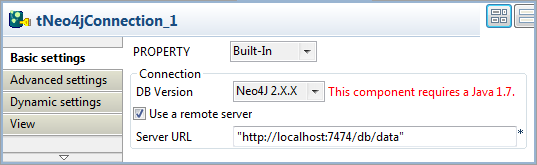
-
From the DB Version list, select
Neo4J 2.X.X to enable node labeling
support. -
In the Database path field, specify the
directory for your data files, “E:/Talend/DB/Neo4j/data” in this example.In this example, you will use Neo4j in embedded mode; to connect to a
remote Neo4j server via REST, click the Use a remote
server check box and specify the URL of the Neo4j
server. -
Double-click the tNeo4jRow component to
open its Basic settings view on the
Component tab.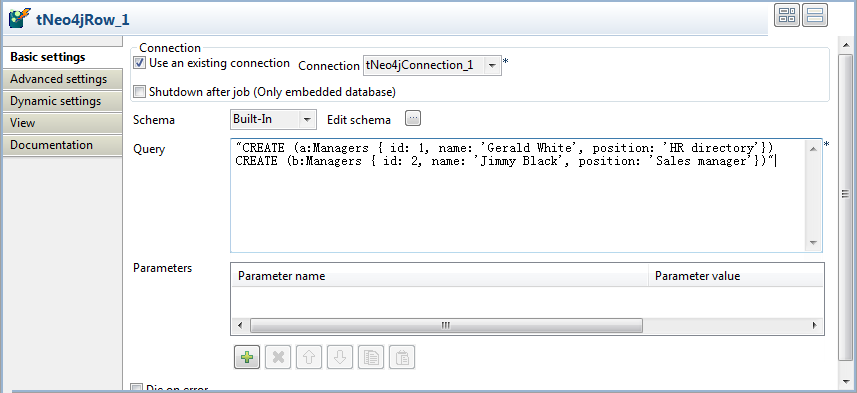
-
Select the Use an existing connection
check box to reuse the Neo4j database connection opened by the tNeo4jConnection component, which is the only
connection component used in this example. -
In the Query field, type in the Cypher
query to be executed by the component.In this example, type in the following query to create two nodes with the
label Managers and three properties –
id, name, and position:12"CREATE (a:Managers { id: 1, name: 'Gerald White', position: 'HR directory'})CREATE (b:Managers { id: 2, name: 'Jimmy Black', position: 'Sales manager'})"As this component does not have an input flow, leave the schema and the
parameter settings blank.
Document get from Talend https://help.talend.com
Thank you for watching.
Subscribe
Login
0 Comments