Configuring the data display mode and executing the Job
-
Double-click the tLogRow component to
display its Basic settings
view. -
In the Mode area, select Table (print values in cells of a
table) for better readability of the
result.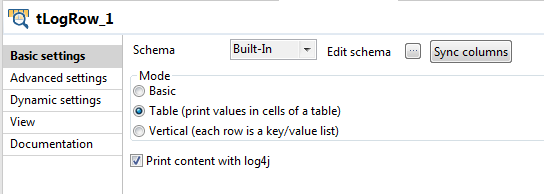
-
Save the Job and press F6 to run
it.According to the stored procedure and the price range, the
Product data records within the price
range of 10 to 15 are displayed with the values of the
Name and Price
fields as expected.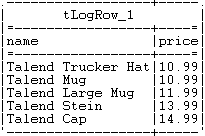
Document get from Talend https://help.talend.com
Thank you for watching.
Subscribe
Login
0 Comments