Configuring the input and output components
-
Double-click the tFileInputDelimited
component, which is labeled Source, to
display its Basic settings view where you
can define the component properties.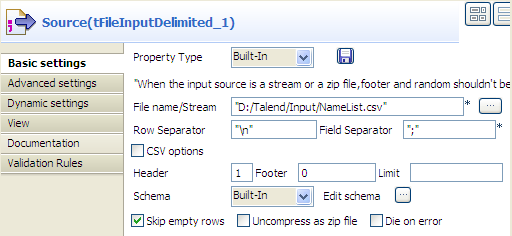 Warning:
The dynamic schema feature is only supported in Built-In mode and requires the input file
to have a header row. -
In the File name/Stream field, type in
the path to the input file in double quotation marks, or browse to the path
by clicking the […] button. -
In the Header field, type in 1 to use the first line of the file as the
header. -
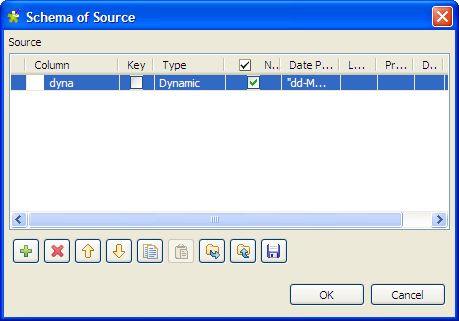
Click the […] button next to Edit schema to open the [Schema] dialog box.
-
Click the [+] button to add a column,
give a name to the column, dyna in this
example, and select Dynamic from the
Type list. This dynamic column will
retrieve the three columns, FirstName,
LastName and Address, of the input file. -
Click OK to validate the setting and
close the dialog box. -
Double-click the tFileOutputDelimited
component, which is labeled Target, to
display its Basic settings view where you
can define the component properties.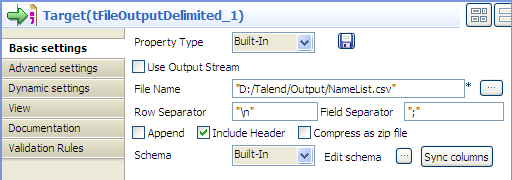
-
Define the output file path in the File
Name field. -
Select the Include Header check box to
include the header in the output file. Leave all the other settings are they
are.
Document get from Talend https://help.talend.com
Thank you for watching.
Subscribe
Login
0 Comments