Configuring the input flow
-
Double-click the tFileInputXML component labelled
Customers to open its Basic
settings view.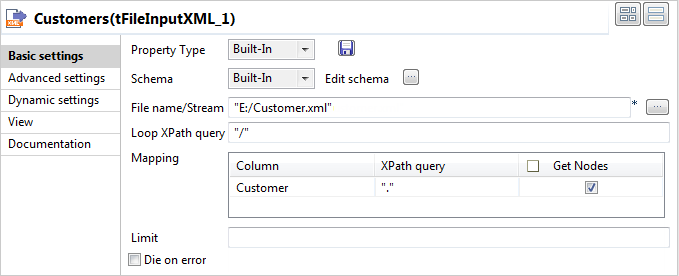
-
Click the […] button next to Edit
schema and in the [Schema]
dialog box define the schema by adding one column Customer of Document
type.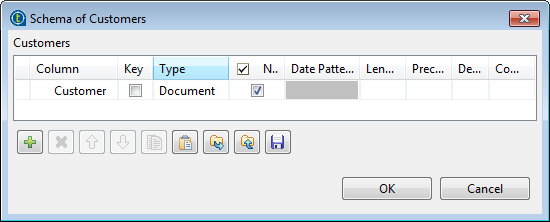 Note that the Document data type is essential
for making full use of tXMLMap. For further
information about this data type, see
Talend Studio User
Guide. -
Click OK to validate the changes and close the dialog
box. One row is added automatically to the Mapping table. -
In the File name/Stream field, browse to or type in
between double quotation marks the path to the XML source file that provides the
customer data. In this scenario, it is E:/Customer.xml. -
In the Loop XPath query field, type in an XPath
expression between double quotation marks to specify the node on which the loop
is based. In this scenario, it is /, which
means to perform look query from the root. -
In the XPath query column of the Mapping table, type in the fields to be queried between double
quotation marks. In this scenario, it is .,
which means all fields under the current node (root) will be extracted. -
In the Get Nodes column of the Mapping table, select the check box.
In order to build the Document type data
flow, it is necessary to get the nodes from this component.
Document get from Talend https://help.talend.com
Thank you for watching.
Subscribe
Login
0 Comments