Configuring the second tXMLMap component
-
Connect tRESTRequest to the other tXMLMap using the Row > GetUserNumber
connection. -
Double-click the first tXMLMap in the design
workspace to open the Map Editor.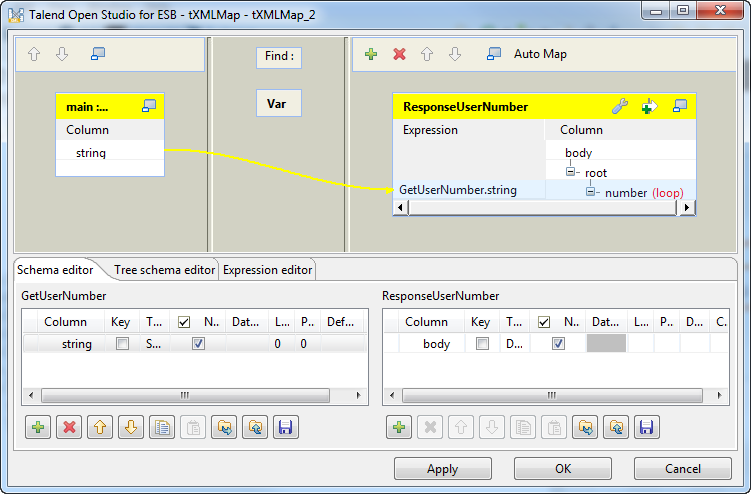
-
Click the [+] button on the top right to add
an output and name it as ResponseUserNumber. -
Click the [+] button on the bottom right to
add one column for the output.Name the first column as body and set the Type to Document. -
Right-click on the node root and select
Create Sub-Element to create a sub-element.
Name the sub-element as number in the popup dialog
box. -
Right-click on the number node created in the previous
step and select As loop element. -
Select the string column of the GetUserNumber table to the left and drop it onto
the Expression field of the number node of the ResponseUserNumber table to the right. - Click OK to save the settings.
Document get from Talend https://help.talend.com
Thank you for watching.
Subscribe
Login
0 Comments