Configuring the standardization process
To do this, proceed as follows:
-
Double click tStandardizePhoneNumber to
open its Component view.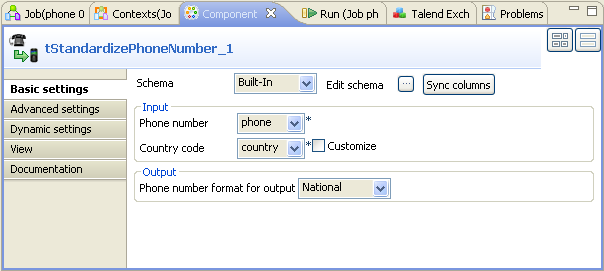
-
If required, click Sync columns to
retrieve the schema from the previous component. -
In the Phone number field, select
phone from the drop-down list as this column holds
the phone numbers to be processed. -
In the Country
code field, select
country from the drop-down list as this column provides the
country code to be used. In this scenario, this code is the French country
code FR. -
In the Phone number format for output
field, select National as you need to
standardize these phone numbers according to the national standard format of
France.
Document get from Talend https://help.talend.com
Thank you for watching.
Subscribe
Login
0 Comments