Configuring tJDBCOutput
-
Double-click tJDBCOutput to open its
Component view.
-
In the JDBC URL field, enter the URL of
the database in which you need to write the duplicate entries. In this
example, it is jdbc:mysql://10.42.10.13:3306/Talend, a MySQL database
called Talend. -
In the Drive JAR table, add one row to
the table by clicking the
button.
-
Click this new row and then click the

button to open the [Select
Module] dialog box from which to import the jar file required
by the MySQL database.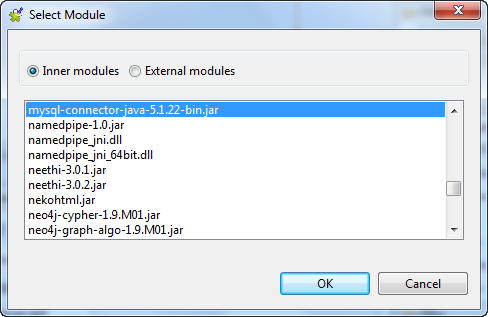
-
In the Class name field, enter the class
file to be called. In this example, it is org.gjt.mm.mysql.Driver. -
In the User name and the Password fields, enter the authentication
information to that database. -
In the Table name field, enter the name
of the table in which you need to write data, for example, Namelist. This table must already exist.
Document get from Talend https://help.talend.com
Thank you for watching.
Subscribe
Login
0 Comments