Creating the parsing rules
-
Double-click the tStandardizeRow
component to display its Basic settings
view.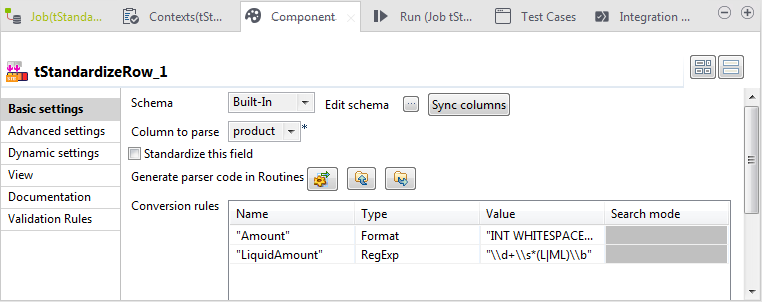
-
From the Column to parse list, select
product. -
In the Conversion rules table, define a
basic rule and an advanced rule as the following:-
Click twice on the [+] button to
add two columns. Name the first as “Amount” and
the second as “LiquidAmount”. -
Select Format as the type for
the basic rule, and define it to read"INT WHITESPACE*.
WORD" -
Select RegExp as the type for
the advanced rule, and define it to read
"\d+\s*(L|ML)\b".The advanced rule will be executed after the basic ANTLR rule. The
“Amount” rule will tokenize the amounts in
the three strings, it matches any word with a numeric in front of
it. Then the RegExp rule will
check each token created by ANTLR against a regular
expression.
-
-
Click the Generate parser code in
Routines button in order to generate the code under the
Routines folder in the DQ Repository tree view of the
Profiling
perspective.This step is mandatory, otherwise the Job will not be executed. -
In the Advanced settings view, leave the
options selected by default in the Output
format area as they are.The Max edits for fuzzy match is set to
1 by default. -
Double-click the tLogRow component and
select the Table (print values in cells of a
table) option in the Mode
area.
Document get from Talend https://help.talend.com
Thank you for watching.
Subscribe
Login
0 Comments