Dropping and connecting the components
-
In the Repository view, expand the Metadata node and the directory in which the file is
saved. Then drag this file into the design workspace.The dialog box below appears.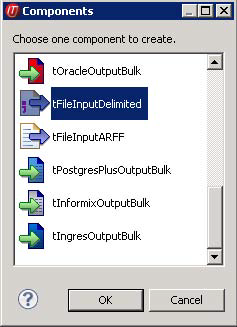
-
Select tFileInputDelimited and then click
OK to close the dialog box.The component is displayed in the workspace. - Drag the following components from the Palette into the design workspace: two tMap components, tUniservRTMailSearch and tUniservRTMailOutput .
-
Connect tMap with tUniservRTMailSearch first.
Accept the schema from tUniservRTMailSearch
by clicking Yes on the prompt window.
-
Connect the other components via Row >
Main.
Document get from Talend https://help.talend.com
Thank you for watching.
Subscribe
Login
0 Comments