Drop and link components
-
Create a first Job named parentJob:
right-click on the Job Design node of the
Repository, and choose Create a Job. - From the Palette, drop a tSetEnv component, two tMsgBox components, and one tRunJob component onto the design workspace.
-
Connect the tSetEnv component to a first
tMsgBox component with a OnSubjobOk link : right-click on the start component,
select Trigger, then OnSubjobOk. Then click on the end component you want to
connect. -
Connect the first tMsgBox component to the
tRunJob with a OnSubjobOk link. -
Then connect the tRunJob component to the
second tMsgbox with a OnSubjobOk link.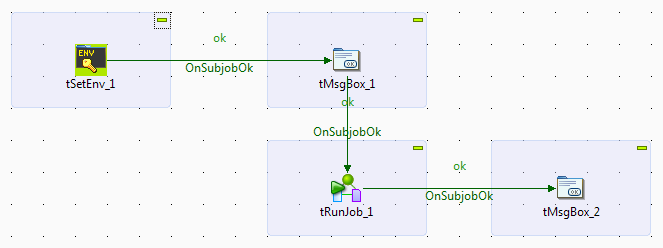
- Now create a child Job named ChildJob.
- From the Palette, drop a tSetEnv component onto the design workspace.
-
Connect the tSetEnv component to the
tMsgBox with a OnSubjobOk link: right-click on the start component, select
Trigger, then OnSubjobOk. Then click on the end component you want to
connect.
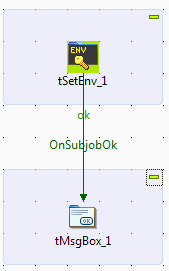
Document get from Talend https://help.talend.com
Thank you for watching.
Subscribe
Login
0 Comments