Extracting and synchronizing data changes to the target table
-
Double-click tOracleCDC to open its
Basic settings view.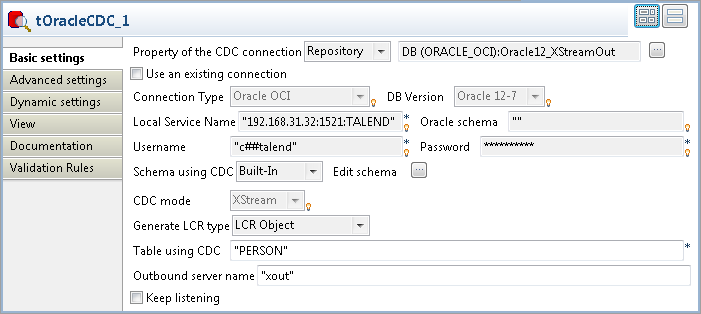
-
Set Property of the CDC connection to Repository and select the connection metadata
corresponding to the Oracle database on which the XStream outbound server is
configured, Oracle12_XStreamOut in this
example. The connection type, database version and other connection details
information will be completed automatically. -
Select LCR Object from the Generate LCR type drop-down list.
In the Table using CDC field, enter the name of the
source table from which changes made to data are to be captured. In this
example, it is PERSON.In the Outbound server name field, enter
the XStream outbound server name. In this example, it is xout. -
Click the […] button next to Edit schema to open the schema editor, and you
will see that the schema has been set by default.
-
Click Advanced settings to open its
view. In the Idle timeout(seconds) field, enter the number of
seconds of idle time that the outbound server waits for an LCR before
terminating the call to get or receive an LCR stream. Considering the
network latency and the database response rate, the idle time is set to
60 seconds in this example. -
Double-click tOracleCDCOutput to open its
Basic settings view.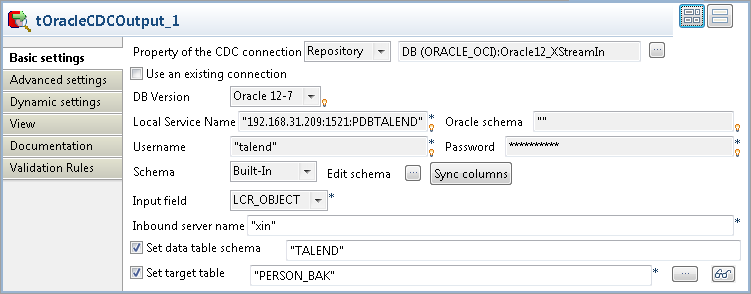 Set Property of the CDC connection to Repository and select the connection metadata
corresponding to the Oracle database on which the XStream inbound server is
configured, Oracle12_XStreamIn in this
example. The database version and other connection details information will
be completed automatically. -
In the Inbound server name field, enter
the XStream inbound server name. In this example, it is xin.Select the Set data table schema check
box and specify the schema of the CDC table. In this example, it is
TALEND.Select the Set target table check box and
specify the table to which data changes from the inbound server will be
replicated. In this example, it is PERSON_BAK.
Document get from Talend https://help.talend.com
Thank you for watching.
Subscribe
Login
0 Comments