Linking the components
-
Drop the DB Connection under the Metadata
node of the Repository to the design
workspace. In this example, the source table is called
people_age. -
Select tMysqlInput from the list that
pops up when dropping the component.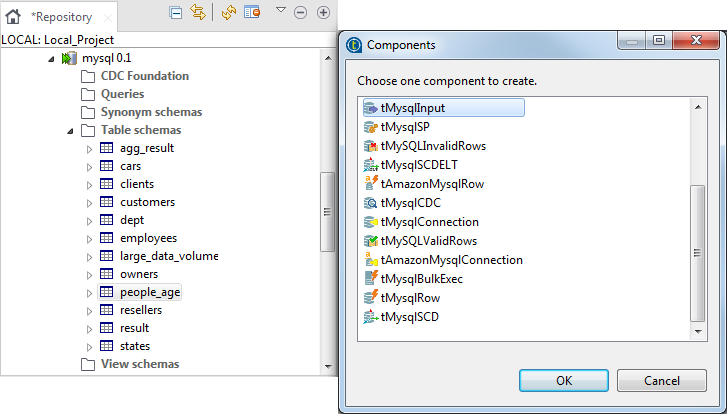
-
Drop the lookup DB connection table from the Metadata node to the design workspace selecting tMysqlInput from the list that pops up. In this
Job, the lookup is called large_data_volume. -
The same way, drop the DB connection from the Metadata node to the design workspace selecting tMysqlConnection from the list that pops up. This
component creates a permanent connection to the lookup database table in
order not to do that every time we want to load a row from the lookup
table. -
Then pick the tMap component from the
Processing family, and the tMysqlOutput and tMysqlCommit components from the Database family in the Palette
to the right hand side of the editor. -
Now connect all the components together. To do so, right-click the
tMysqlInput component corresponding to
the people table and drag the link towards tMap. -
Release the link over the tMap component,
the main row flow is automatically set up. -
Rename the Main row link to
people, to identify more easily the main flow
data. -
Perform the same operation to connect the lookup table
(large_data_volume) to the tMap component and the tMap
to the tMysqlOutput component. -
A dialog box prompts for a name to the output link. In this example, the
output flow is named: people_mixandmatch.
-
Rename also the lookup row connection link to
large_volume, to help identify the reference data
flow. - Connect tMysqlConnection to tMysqlInput using the trigger link OnSubjobOk.
-
Connect the tMysqlInput component to the
tMysqlCommit component using the
trigger link OnSubjobOk.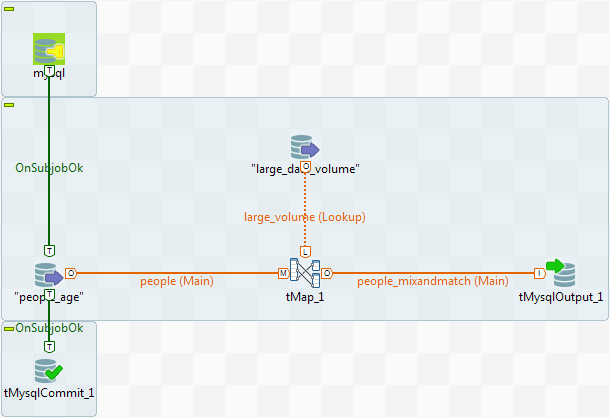
Document get from Talend https://help.talend.com
Thank you for watching.
Subscribe
Login
0 Comments