Reading data from the Neo4j database
-
Double-click the tNeo4jInput component to
open its Basic settings view.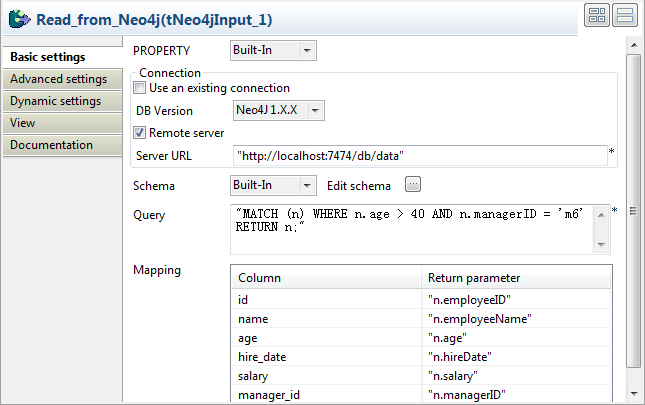
-
As in the tNeo4jOutput component, specify
the URL of the Neo4j server to connect to, “http://localhost:7474/db/data” in this example. -
Click the […] button next to Edit schema and define the schema for employees
information display. When done, click OK to
close the [Schema] dialog box and propagate
the schema to the next component.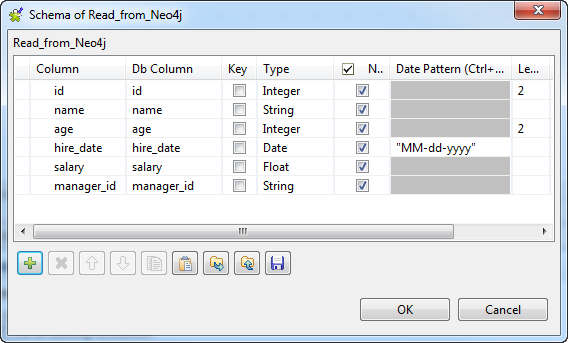 The defined schema columns automatically appear in the Mapping table.
 -
In the Query field, type in the Cypher
query to match the data to read from the Neo4j database. In this example,
use the following Cypher query to find employees who are more than 40 years old and are under the manager
m6.1"MATCH (n) WHERE n.age > 40 AND n.managerID = 'm6' RETURN n;" -
Fill the Return parameter field for each
schema column with a return parameter in double quotes to map the node
properties in the Neo4j database with the schema columns. -
Double-click the tLogRow component to
open its Basic settings view, and select
the Table (print values in cells of a
table) option to display the retrieved information in a
table.
Document get from Talend https://help.talend.com
Thank you for watching.
Subscribe
Login
0 Comments