Retrieving messages from an Amazon SQS queue
Configure the tSQSInput component
and the tLogRow component to retrieve all messages from
an existing Amazon SQS queue and display the retrieved messages on the console of
Talend Studio
.
and the tLogRow component to retrieve all messages from
an existing Amazon SQS queue and display the retrieved messages on the console of
Talend Studio
.
-
Double-click the tSQSInput component
to open its Basic settings view.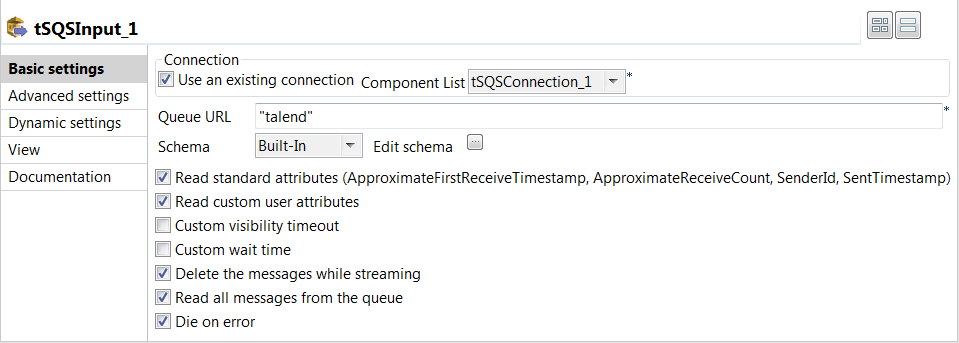
-
Specify the connection details required to access Amazon SQS. In this
example, select the Use an existing connection
check box and from the Component List drop-down
list displayed, select the connection component to reuse its connection details you
have already defined. -
In the Queue URL field, enter the name
for the queue from which the messages will be retrieved. In this example, it is
talend. -
Click the

button next to Edit schema to
open the schema dialog box.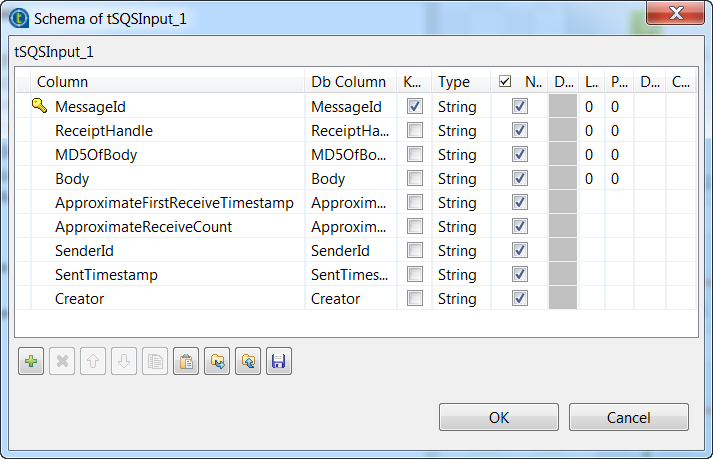 You can see the schema of the tSQSInput component
is predefined with four columns of String type: MessageId,
ReceiptHandle, MD5OfBody and
Body. -
Click the

button to add five columns of String type, including four
Amazon SQS attributes ApproximateFirstReceiveTimestamp,
ApproximateReceiveCount, SenderId and
SentTimestamp and one customized attribute
Creator. -
Click OK to save the changes and close
the schema dialog box. -
Select the Read standard attributes and Read custom user attributes check boxes to retrieve the
value of four Amazon SQS attributes and one customized user attribute along with
each message. -
Double-click the tLogRow component to
open its Basic settings view, and then select
Table (print values in cells of a table) in the
Mode area for better readability of the
result.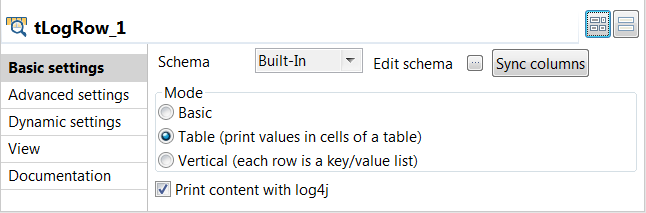
Document get from Talend https://help.talend.com
Thank you for watching.
Subscribe
Login
0 Comments