Retrieving the data from Redshift
-
Double-click tRedshiftInput to open its
Basic settings view.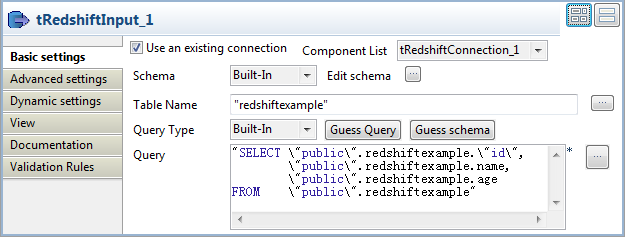
-
Select the Use an existing connection
check box, and then select the connection you have already configured for
tRedshiftConnection from the Component List drop-down list. - Click the […] button next to Edit schema to open the schema editor.
-
In the schema editor, click the [+]
button to add three columns: id of the
interger type, name of the string type,
and age of the integer type. The data
structure is same as the structure you have defined for tFixedFlowInput. -
Click OK to validate the changes and
accept the propagation prompted by the pop-up [Propagate] dialog box. -
In the Table Name field, enter or browse
to the table into which you write the data, redshiftexample in this scenario. -
Click the Guess Query button to generate
the query. The Query field will be filled
with the automatically generated query.
Document get from Talend https://help.talend.com
Thank you for watching.
Subscribe
Login
0 Comments