Selecting the files
-
Double-click tHDFSGet to open its
Component view.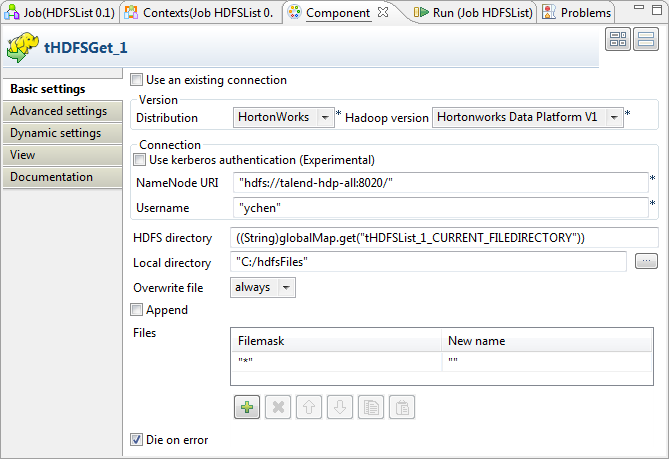
-
In the Version area, select the Hadoop
distribution you are connecting to and its version. -
In the Connection area, enter the values
of the parameters required to connect to the HDFS.In the real-world practice, you may have used tHDFSConnection to create a connection; then you can reuse
it from the current component. For further information, see tHDFSConnection. -
In the HDFS directory field, enter the
path to the folder holding the files to be retrieved.To do this with the auto-completion list, place the mouse pointer in this
field, then, press Ctrl+Space to display
the list and select the
tHDFSList_1_CURRENT_FILEDIRECTORY variable to reuse the
directory you have defined in tHDFSList. In
this variable, tHDFSList_1 is the label
of the component. If you label it differently, select the variable
accordingly.Once selecting this variable, the directory reads, for example, ((String)globalMap.get(“tHDFSList_1_CURRENT_FILEDIRECTORY”))
in this field.For further information about how to label a component, see the
Talend Studio
User
Guide. -
In the Local directory field, enter the
path, or browse to the folder you want to place the selected files in. This
folder will be created if it does not exist. In this example, it is
C:/hdfsFiles. -
In the Overwrite file field, select
always. -
In the Files table, click

to add one row and enter * between the quotation marks in the Filemask column in order to get any files existing.
Document get from Talend https://help.talend.com
Thank you for watching.
Subscribe
Login
0 Comments