Setting up the Job
-
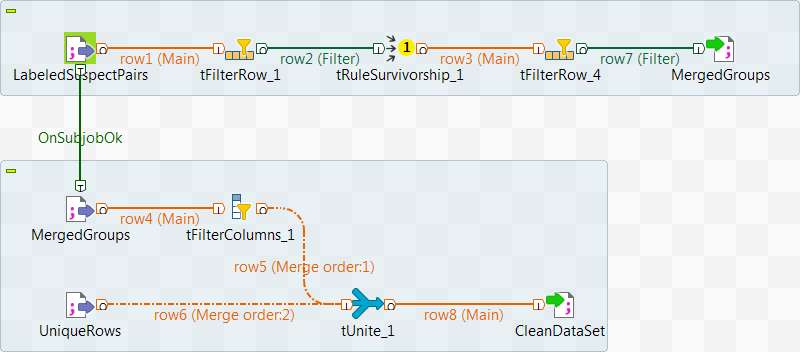
Set up the first subjob:
-
Drop the following components from the Palette onto the design
workspace: tFileInputDelimited, two
tFilterRow components and
tFileOutputDelimited.Use the Main link to connect the
components. -
Connect tFileInputDelimited to the first
tFilterRow component. -
Connect the first tFilterRow component to
tRuleSurvivorship. -
Connect tRuleSurvivorship to the second
tFilterRow component. -
Connect the second tFilterRow component to
tFileOutputDelimited.
-
Drop the following components from the Palette onto the design
-
Set up the second subjob:
-
Drop the following components from the Palette onto the design
workspace: two tFileInputDelimited components,
tFilterColumns, tUnite
and tFileOutputDelimited.Use the Main link to connect the
components. -
Connect the first tFileInputDelimited component
to tFilterColumn. -
Connect tFilterColumn to
tUnite. -
Connect the second tFileInputDelimited component
to tUnite. -
Connect tUnite to
tFileOutputDelimited.
-
Drop the following components from the Palette onto the design
-
Connect the tFileInputDelimited from the first subjob to
the tFileInputDelimited from the second subjob using a Trigger > OnSubjobOk link.
Document get from Talend https://help.talend.com
Thank you for watching.
Subscribe
Login
0 Comments