Writing data to Neo4j and creating indexes and relationships
-
Click the tNeo4jOutput component and
select the Component tab to open its
Basic settings view.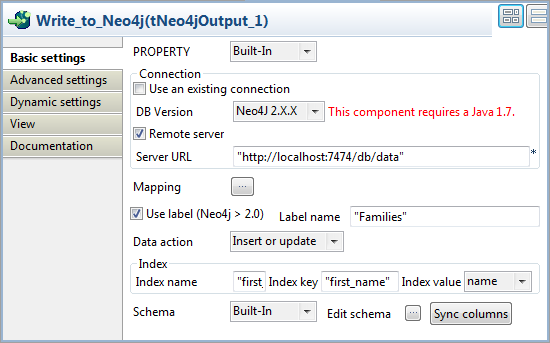
-
From the DB Version list, select
Neo4J 2.X.X to enable node
labeling. -
Define a Neo4j database connection. In this example, the Neo4j database is
accessible in REST mode, so select the Remote
server check box and specify the URL of the Neo4j server in
the Server URL field, “http://localhost:7474/db/data” in this
example. -
Double-click the tNeo4jOutput component
or click the Mapping button on the
component’s Basic settings view to open the
index and relationship mapping editor. -
With the name column selected from the
schema panel, click the Index creation tab,
click the [+] button to add a row in the
table, and create an index named first_name on this column:-
In the Name field, enter
first_name between double
quotation marks. -
In the Key field, enter first_name between double quotation
marks to give the index a key.
Then click in the schema panel to validate your index creation. -
-
With the family column selected from
the schema panel, click the Index creation
tab, click the [+] button to add a row in
the table, and create an index named family on this column:-
In the Name field, enter
family between double
quotation marks. -
In the Key field, enter family_name between double quotation
marks to give the index a key.
Then click in the schema panel to validate your index creation.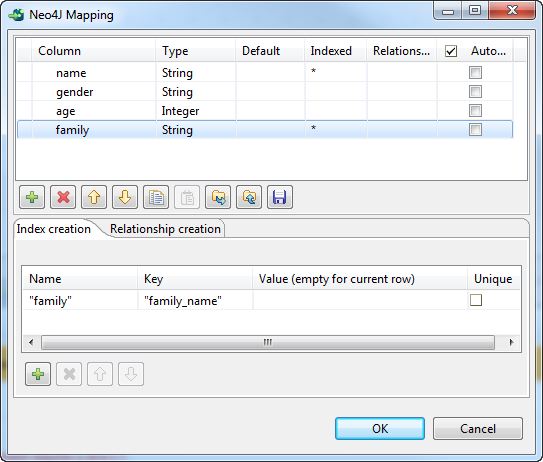
-
-
With the family column selected from
the schema panel, click the Relationship
creation tab, click the [+]
button to add a row in the table, and create a relationship named Spouse on this column based on the index named
family:-
In the Type field, enter
Spouse between double
quotation marks. -
From the Direction list field,
select either Outgoing or Incoming. -
In the Index Name field, enter
family between double
quotation marks. -
In the Index Key field, enter
family_name between double
quotation marks.
Then click in the schema panel to validate your relationship creation, and
click OK to close the mapping
editor.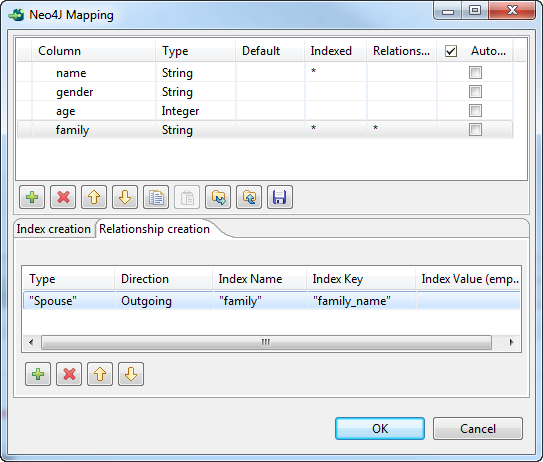
-
-
Select the Use label (Neo4j > 2.0) check
box and enter Families between double
quotation marks in the Label name field so
that the nodes to be created will be labeled Families. -
From the Data action list, select
Insert or update, and set a reference
key in the Index area that appears:-
In Index name field, enter
first_name between double
quotation marks. -
In Index key field, enter
first_name between double
quotation marks. -
From Index value field, select
name. As the Value field is left blank in index
creation, the index value will be the value of the name column for each row.
This way, when the Job is executed, nodes will be inserted or updated in
the Neo4j database based on the first_name index: for each data row, if a node containing
the same first name already exists in the database, the node will be
updated; otherwise, a new node will be created. -