Writing results in HDFS
-
Double-click tHDFSOutput to open its
Component view.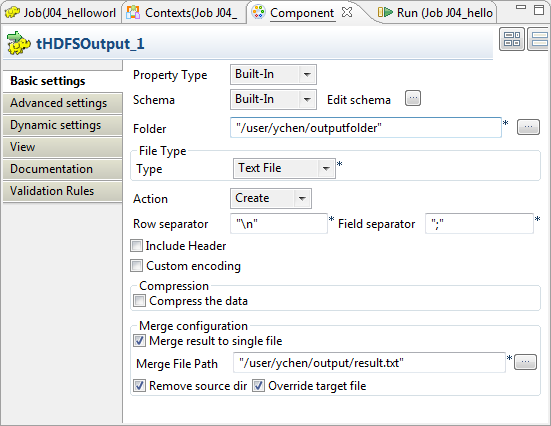
-
In the Folder field, enter the path, or
browse to the folder you want to write the results in. -
From the Type list, select the data format for the
results to be written. In this example, select Text
file. -
From the Action list, select the
operation you need to perform on the file in question. If the file already
exists, select Overwrite; otherwise, select
Create. -
Select the Merge result to single file
check box and enter the path, or browse to the file you need to write the
merged output data in. -
If you need to remove the source data of the merge, select Remove source dir. In this scenario, select
it. -
If the file for the merged data exists, select the Override target file check box to overwrite that
file.
Document get from Talend https://help.talend.com
Thank you for watching.
Subscribe
Login
0 Comments