
|
Component family |
Business Intelligence/Cube OLAP/Palo |
|
|
Function |
This component retrieves a list of database details from the given |
|
|
Purpose |
This component lists database names, database types, number of |
|
|
Basic settings |
Use an existing connection |
Select this check box and in the Component List click the NoteWhen a Job contains the parent Job and the child Job, Component |
|
Connection configuration NoteUnavailable when using an existing connection. |
Host Name |
Enter the host name or the IP address of the host server. |
|
|
Server Port |
Type in the listening port number of the Palo server. |
|
|
Username and |
Enter the Palo user authentication data. To enter the password, click the […] button next to the |
|
Advanced settings |
tStat |
Select this check box to collect log data at the component |
|
Global Variables |
NB_DATABASES: the number of databases. This is an After DATABASEID: the ID of the database. This is a Flow DATABASENAME: the name of the database. This is a Flow ERROR_MESSAGE: the error message generated by the A Flow variable functions during the execution of a component while an After variable To fill up a field or expression with a variable, press Ctrl + For further information about variables, see Talend Studio |
|
|
Connections |
Outgoing links (from this component to another): Row: Main; Iterate
Trigger: Run if; On Subjob Ok; On Incoming links (from one component to this one): Row: Iterate
Trigger: Run if; On Subjob Ok; On For further information regarding connections, see |
|
|
Usage |
This component can be used as a start component. It requires an |
|
|
Log4j |
The activity of this component can be logged using the log4j feature. For more information on this feature, see Talend Studio User For more information on the log4j logging levels, see the Apache documentation at http://logging.apache.org/log4j/1.2/apidocs/org/apache/log4j/Level.html. |
|
|
Limitation |
The output schema is fixed and read-only. Due to license incompatibility, one or more JARs required to use this component are not |
|
The below table presents information related to the read-only output schema of the
tPaloDatabaseList component.
|
Database |
Type |
Description |
|---|---|---|
|
Database_id |
long |
Internal ID of the database. |
|
Database_name |
string |
Name of the database. |
|
Database_dimensions |
int |
Number of dimensions inside the database. |
|
Database_cubes |
int |
Number of cubes inside the database. |
|
Database_status |
int |
Status of the database. – 0 = unloaded – 1 = loaded – 2 = changed |
|
Database_types |
int |
Type of the database. – 0 =normal – 1 =system – 3 =user info |
The Job in this scenario retrieves details of all of the databases from a given Palo
server.
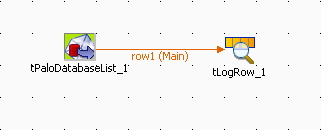
To replicate this scenario, proceed as follows:
-
Drop tPaloDatabaseList and tLogRow from the component Palette onto the design workspace.
-
Right-click tPaloDatabaseList to open the
contextual menu. -
From this menu, select Row >
Main to link the two components.
-
Double-click the tPaloDatabaseList
component to open its Component
view.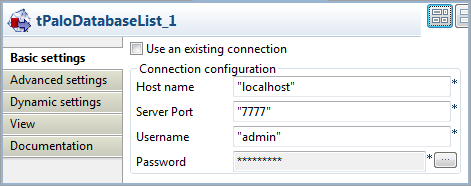
-
In the Host name field, type in the host
name or the IP address of the host server, localhost
for this example. -
In the Server Port field, type in the
listening port number of the Palo server. In this scenario, it is
7777. -
In the Username field and the Password field, type in the authentication
information. In this example, both of them are
admin.
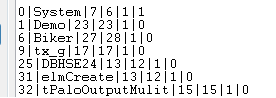
Press F6 to run the Job.
Details of all of the databases in the Palo server are retrieved and listed in the
console of the Run view.
For further information about the output schema, see Discovering the read-only output schema of tPaloDatabaseList.