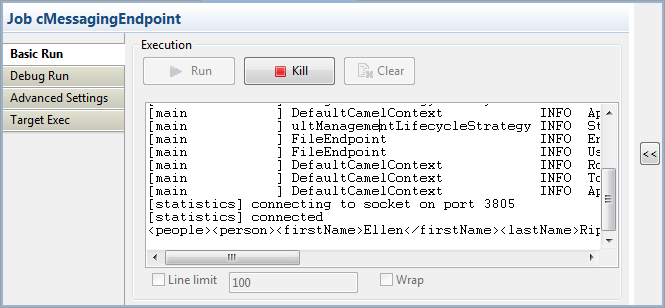
|
Component Family |
Messaging |
|
|
Function |
cMessagingEndpoint allows two |
|
|
Purpose |
cMessagingEndpoint sends or |
|
|
Basic settings |
URI |
URI of the messages to send or receive. It can be of different -File: “file:/”, -Database: “jdbc:/”, -Protocols: “ftp:/”, “http:/” -etc. You can add parameters to the URI using the generic URI syntax,
For more information on the different components that can be used |
|
Advanced settings |
Dependencies |
By default, the camel core supports the following components: To use other components, you have to provide the dependencies Click the plus button to add new lines in the Camel component list. In the line added, |
|
|
Use a custom component |
If you want to use a custom component, select this check box and NoteAll the transitive dependencies of this custom component |
|
Usage |
This component can be used as sending and/or receiving message |
|
|
Limitation |
n/a |
|
The following table lists the most commonly used Camel components that can be called by
cMessagingEndpoint. Click the links in the table to
go to the Apache Camel’s Website for the latest information of the these components.
Make sure to use the information applicable for the Camel Version included in Talend ESB. See also Talend ESB
Mediation Developer Guide for details of the Camel components.
|
Component / ArtifactId / URI |
Description |
|---|---|
|
ActiveMQ / activemq-camel
|
For JMS Messaging with Apache ActiveMQ |
|
AHC /
|
To call external HTTP services using Async Http Client. |
|
APNS /
|
For sending notifications to Apple iOS devices. |
|
Avro /
|
Working with Apache |
|
Atom /
|
Working with Apache |
|
Bean /
|
Uses the Camel Bean Binding to bind message exchanges to beans in |
|
Cache /
|
The cache component facilitates creation of caching endpoints and |
|
Class /
|
Uses the Camel Bean Binding to bind message exchanges to beans in |
|
CMIS /
|
Uses the Apache Chemistry client API to interface with CMIS |
|
Context / camel-context
|
Used to refer to endpoints within a separate CamelContext to |
|
CouchDB / camel-couchdb
|
To integrate with Apache CouchDB. |
|
Crypto (Digital Signatures) / camel-crypto
|
Used to sign and verify exchanges using the Signature Service of |
|
CXF /
|
Working with Apache |
|
CXF Bean / camel-cxf
|
Process the exchange using a JAX WS or JAX RS annotated bean from |
|
CXFRS /
|
Working with Apache |
|
Direct
|
Synchronous call to another endpoint from same CamelContext |
|
Disruptor / camel-disruptor
|
To provide the implementation of SEDA which |
|
ElasticSearch / camel-elasticsearch
|
Uses the Bean |
|
Spring
|
Working with Spring ApplicationEvents |
|
Exec /
|
For executing system commands |
|
Facebook / camel-facebook
|
Providing access to all of the Facebook APIs accessible using |
|
File /
|
Sending messages to a file or polling a file or directory. |
|
Flatpack / camel-flatpack
|
Processing fixed width or delimited files or messages using the |
|
FOP /
|
Renders the message into different output formats using Apache |
|
FreeMarker / camel-freemarker
|
Generates a response using a Freemarker template |
|
FTP /
|
Sending and receiving files over FTP. |
|
FTPS /
|
Sending and receiving files over FTP Secure (TLS and SSL). |
|
Geocoder / camel-geocoder
|
Supports looking up geocoders for an address, or reverse lookup |
|
Google Guava EventBus / camel-guava-eventbus
|
The Google Guava EventBus allows publish-subscribe-style |
|
HBase /
|
For reading/writing from/to an HBase store |
|
HDFS /
|
For reading/writing from/to an HDFS file system |
|
HDFS2 /
|
For reading/writing from/to an HDFS file system |
|
HL7 /
|
For working with the HL7 MLLP protocol and the HL7 model using the |
|
HTTP4 /
|
For calling out to external HTTP servers using Apache HTTP Client |
|
IMAP /
|
Receiving email using IMap |
|
Infinispan / camel-infinispan
|
For reading/writing from/to Infinispan |
|
Jasypt
|
Simplified on-the-fly encryption library, integrated with Camel. |
|
JCR /
|
Storing a message in a JCR (JSR-170) compliant repository like |
|
JDBC /
|
For performing JDBC queries and operations |
|
Jetty /
|
For exposing services over HTTP |
|
JGroups / camel-jgroups
|
The |
|
JMS /
|
Working with JMS providers |
|
JMX /
|
For working with JMX notification listeners |
|
JPA /
|
For using a database as a queue via the JPA specification for |
|
Jsch /
|
Support for the scp protocol. |
|
Kafka /
|
For producing to or consuming from Apache Kafka |
|
Krati /
|
For producing to or consuming to Krati datastores. |
|
Log /
|
Uses Jakarta Commons Logging to log the message exchange to some |
|
Lucene
|
Uses Apache Lucene to perform Java-based indexing and full text |
|
MINA2 /
|
Working with Apache |
|
Mock /
|
For testing routes and mediation rules using mocks |
|
MongoDB / camel-mongodb
|
Interacts with MongoDB databases and collections. Offers producer |
|
MQTT /
|
Component for communicating with MQTT M2M message brokers |
|
Mustache / camel-mustache
|
Generates a response using a Mustache |
|
MyBatis / camel-mybatis
|
Performs a query, poll, insert, update or delete in a relational |
|
Netty /
|
Works as Netty HTTP server and client using the Netty project. |
|
OptaPlanner / camel-optaplanner
|
Solves the planning problem contained in a message with OptaPlanner. |
|
POP3 /
|
Receiving email using POP3 and JavaMail. |
|
Properties / camel-core
|
The properties component facilitates using property placeholders |
|
Quartz
|
Provides a scheduled delivery of messages using the Quartz |
|
Quartz2 / camel-quartz2
|
Provides a scheduled delivery of messages using the Quartz 2.x |
|
RabbitMQ / camel-rabbitmq
|
Component for integrating with RabbitMQ. |
|
Ref /
|
Component for lookup of existing endpoints bound in the Camel |
|
RMI /
|
Working with RMI |
|
RSS /
|
Working with ROME for RSS integration, such as consuming an RSS feed. |
|
Salesforce / camel-salesforce
|
To integrate with Salesforce. |
|
SAP
|
To integrate with SAP NetWeaver |
|
SEDA /
|
Asynchronous call to another endpoint in the same Camel |
|
SERVLET / camel-servlet
|
For exposing services over HTTP through the servlet which is |
|
SJMS /
|
A ground up implementation of a JMS client. |
|
SFTP /
|
Sending and receiving files over SFTP (FTP over SSH). |
|
SMTP /
|
Sending email using SMTP and JavaMail |
|
SMPP /
|
To send and receive SMS using Short Messaging Service Center |
|
SNMP /
|
Polling OID values and receiving traps using SNMP via SNMP4J library |
|
Solr /
|
Uses the Solrj client API to interface with an Apache Lucene |
|
Splunk
|
For working with Splunk |
|
SpringBatch / camel-spring-batch
|
To bridge Camel and Spring |
|
SpringIntegration / camel-spring-integration
|
The bridge component of Camel and Spring Integration |
|
Spring
|
Camel wrapper for Spring LDAP |
|
Spring
|
Component for consuming and producing from Redis key-value store |
|
Spring Web Services / camel-spring-ws
|
Client-side support for accessing web services, and server-side |
|
SQL / camel-sql
|
Performing SQL queries using JDBC |
|
SSH /
|
For sending commands to a SSH server |
|
StAX /
|
Process messages through a SAX ContentHandler. |
|
Stomp /
|
For communicating with Stomp compliant message brokers, like Apache ActiveMQ |
|
Stub /
|
Allows you to stub out some physical middleware endpoint for |
|
Test /
|
Creates a Mock endpoint which expects to receive all the message |
|
Timer /
|
A timer endpoint |
|
Twitter / camel-twitter
|
A twitter endpoint |
|
Velocity / camel-velocity
|
Generates a response using an Apache Velocity |
|
Vertx /
|
Working with the vertx |
|
VM /
|
Asynchronous call to another endpoint in the same JVM |
|
Weather / camel-weather
|
Polls the weather information from Open Weather |
|
Websocket / camel-websocket
|
Communicating with Websocket clients. |
|
XQuery / camel-saxon
|
Generates a response using an XQuery |
|
XSLT /
|
Generates a response using an XSLT template |
|
Yammer
|
Allows you to interact with the Yammer enterprise social |
|
Zookeeper / camel-zookeeper
|
Working with ZooKeeper cluster(s) |
This scenatio uses two cMessagingEndpoint components
to read and move files from one endpoint to another.
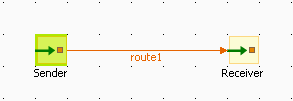
-
From the Messaging folder of the
Palette, drag and drop two cMessagingEndpoint components onto the design
workspace, one as the message sender and the other as the message receiver,
and label them Sender and Receiver respectively to better identify their
roles in the Route. -
Right-click the component labeled Sender, select Row >
Route in the menu and drag to the
Receiver to link them together with a
route link.
-
Double-click the component labeled Sender to open its Basic
settings view in the Component tab. -
In the URI field, type in the URI of the
messages you want to route.As we are handling files, type in “file:///” and the
path to the folder containing the files.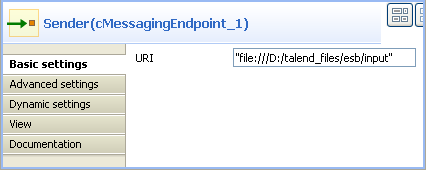
-
Double-click the component labeled Receiver to open its Basic
settings view in the Component tab. -
In the URI field, type in the URI of the
folder where you want to route your message.As we are handling files, type in “file:///” and the
path to the folder to which the files will be sent.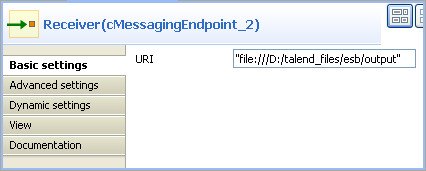
-
Press Ctrl+S to save your Route.
-
To have a look at the generated code, click the Code tab at the bottom of the design workspace.
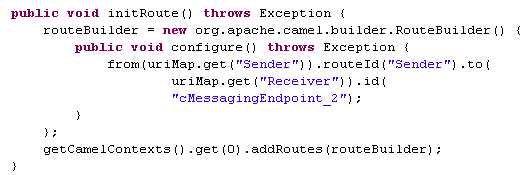
The code shows the
fromand.tocorresponding to
the two endpoints:fromfor the sending one and
.tofor the receiving one. -
In the Run view, click the Run button to launch the execution of your Route.
You can also press F6 to execute it.
RESULT: The files are moved from their original folder to the target one.
Furthermore, a new .camel folder is created
in the source folder containing the consumed files. This is Camel’s default
behavior. Thus, the files will not be processed endlessly but they are
backed up in case of problems.
This scenario accesses FTP service and transfers files from one endpoint to
another.
-
From the Messaging folder of the
Palette, drag and drop two cMessagingEndpoint components onto the design
workspace, one as the message sender and the other as the message receiver,
and label them Sender and Receiver respectively to better identify their
roles in the Route. -
Right-click the component labeled Sender, select Row >
Route in the menu and drag to the
Receiver to link them together with a
route link.
-
Double-click the component labeled Sender to display its Basic
settings view in the Component tab. -
In the URI field, type in the URI of the
message you want to route.Here, we are using an FTP component:
ftp://indus@degas/remy/camelwith URI specific parameters
authenticating the FTP connection:
?username=indus&password=indus.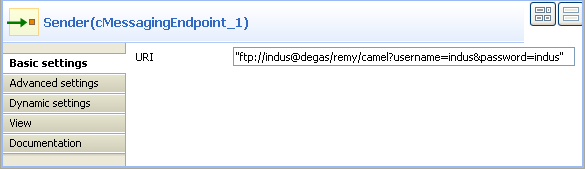
-
For the FTP component to work in Camel, click the Advanced settings tab of cMessagingEndpoint, click the [+] button to add a Camel component in the Dependencies table, and select
ftp from the Camel
component list to activate the FTP component.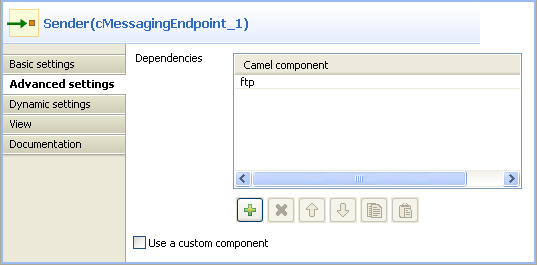
-
Double-click the component labeled Receiver to open its Basic
settings view in the Component tab. -
In the URI field, type in the URI of the
folder to which you want your message to be routed.As we are handling files, type in “file:///” and the
path to the folder to which the files will be sent. -
Press Ctrl+S to save your Route.
-
To have a look at the generated code, click the Code tab at the bottom of the design workspace.

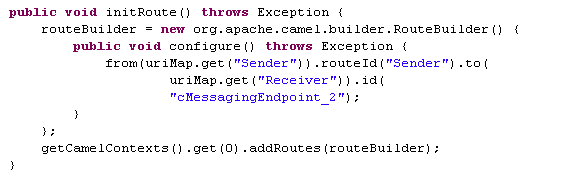
In this part of code, we can see a route represented by
from
and.to, corresponding to the sending and receiving
endpoints. -
In the Run view, click the Run button to launch the execution of your Route.
You can also press F6 to execute it.
RESULT: The message is sent (copied) to the receiving endpoint.
In this scenario, we will use a cMessagingEndpoint
component to call a Route Resource as an Xquery parser to extract messages from the
local file system.
The following sample XML file is used in this scenario:
|
1 2 3 4 5 6 7 8 9 10 11 12 |
<people> <person id="8"> <firstName>Ellen</firstName> <lastName>Ripley</lastName> <city>Washington</city> </person> <person id="9"> <firstName>Peter</firstName> <lastName>Green</lastName> <city>London</city> </person> </people> |
-
From the repository tree view, right-click the Resources node and select Create
Resource from the context menu.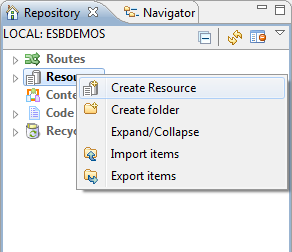
-
The [New Route Resource] wizard opens. In the Name field, type in a name for the Resource, for
example, SampleXquery. Click Finish to close the wizard.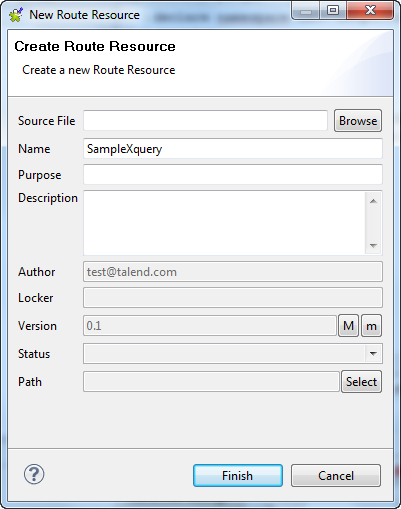
-
Enter the following code in the editor to extract the
firstName and lastName of all
the person elements.1234567891011declare namespace ns0="http://com.sap/b";<people>{for $p in /people//personreturn<person><firstName>{$p/firstName/text()}</firstName><lastName>{$p/lastName/text()}</lastName></person>}</people> -
Press Ctrl+S to save your Route
Resource.
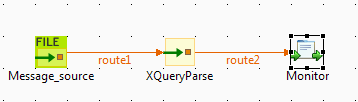
-
From the Messaging folder of the
Palette, drag and drop a cFile and a cMessagingEndpoint component onto the design
workspace. -
From the Processor folder, drag and drop
a cProcessor component onto the design
workspace. -
Link the components with the Row >
Route connection as shown above. -
Label the components for better identification of their
functionality.
-
Double-click the cFile component to open
its Basic settings view in the Component tab.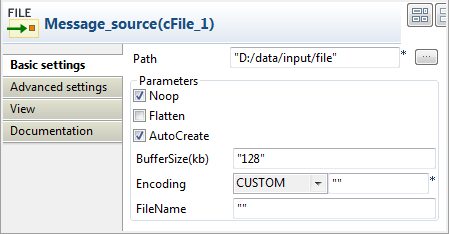
-
In the Path field, specify the path where
the source file people.xml is located. -
Right-click the Route from the repository tree view and select Manage Route Resources from the context
menu.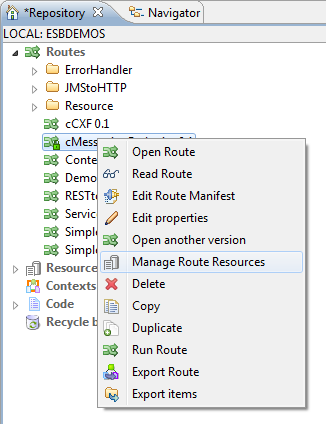
The [Manage Route Resources] wizard is opened.
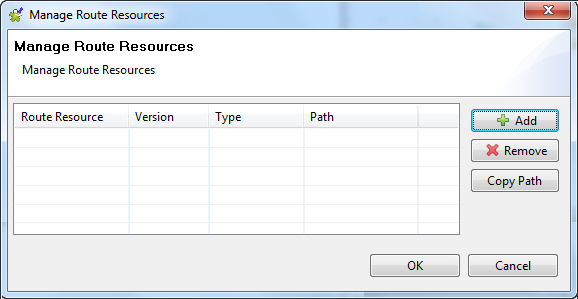
-
In the [Manage Route Resources] wizard, click Add and select SampleXquery from the Resources tree view in the dialog.
Click OK.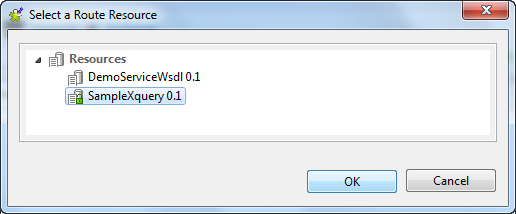
The SampleXquery Route Resource is added in the table
of the [Manage Route Resources]
wizard.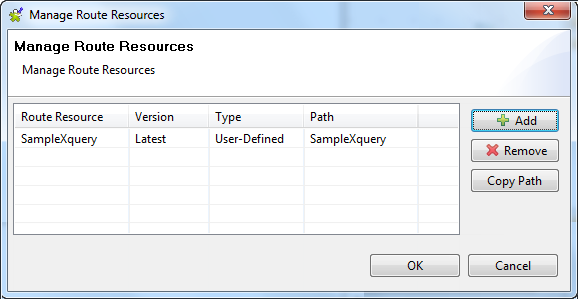
-
Select the SampleXquery from the Route
Resources list and click Copy Path. Click
OK to close the wizard. -
Double click the cMessagingEndpoint
component to display its Basic settings
view in the Component tab.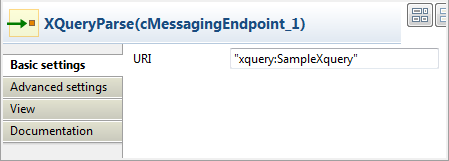
-
In the URI field, enter xquery: and paste the path of the Route
Resource SampleXquery that we just copied
in double quotation marks. -
Click the Advanced settings tab, add the
Camel component saxon in the Dependencies list. For more information about
Xquery, see Apache Camel’s Website:
http://camel.apache.org/xquery-endpoint.html.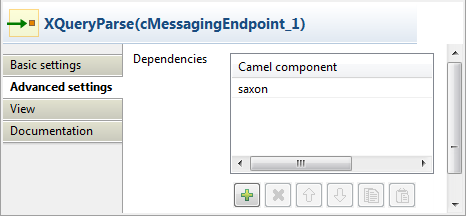
-
Double-click the cProcessor component to
open its Basic settings view in the
Component tab.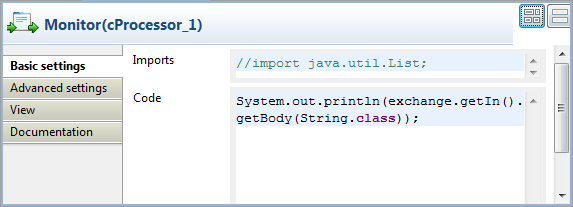
-
In the Code area, enter the following
code to display the messages intercepted on the console:1System.out.println(exchange.getIn().getBody(String.class)); -
Press Ctrl+S to save your Route.
-
To have a look at the generated code, click the Code tab at the bottom of the design workspace.
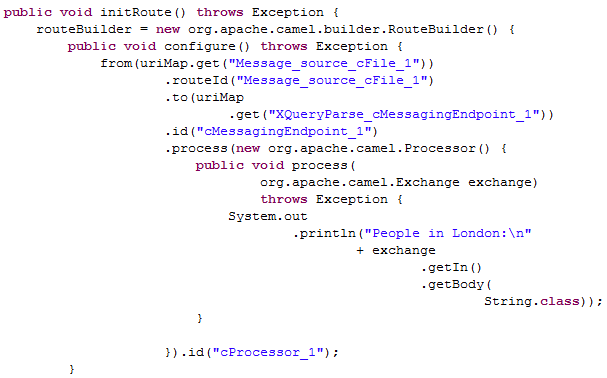
As shown in the code above, the message is routed
from
Message_source_cFile_1
.to
cMessagingEndpoint_1and then processed by
cProcessor_1. -
In the Run view, click the Run button to launch the execution of your Route.
You can also press F6 to execute it.RESULT: The firstName and
lastName of all the person
elements of the source file is printed in the console.