
|
Component family |
ELT/CombinedSQL |
|
|
Function |
tCombinedSQLAggregate collects |
|
|
Purpose |
Helps to provide a set of matrix based on values or calculations. |
|
|
Basic settings |
Schema and Edit |
A schema is a row description, it defines the number of fields that will be processed Since version 5.6, both the Built-In mode and the Repository mode are Click Edit schema to make changes to the schema. If the
Click Sync columns to retrieve |
|
|
|
Built-in: You create and store |
|
|
|
Repository: You have already |
|
|
Group by |
Define the aggregation sets, the values of which will be used for |
|
|
|
Output Column: Select the column |
|
|
|
Input Column: Select the input |
|
|
Operations |
Select the type of operation along with the value to use for the |
|
|
|
Output Column: Select the |
|
|
|
Function: Select any of the |
|
|
|
Input column: Select the input |
|
Advanced settings |
tStatCatcher Statistics |
Select this check box to gather the Job processing metadata at a |
|
Global Variables |
NB_LINE: the number of rows read by an input component or
QUERY: the SQL query statement being processed. This is a ERROR_MESSAGE: the error message generated by the A Flow variable functions during the execution of a component while an After variable To fill up a field or expression with a variable, press Ctrl + For further information about variables, see Talend Studio |
|
|
Usage |
This component is an intermediary component. The use of the |
|
|
Limitation |
n/a |
|
The following scenario creates a Job that opens a connection to a MySQL database
and:
-
instantiates the schema from a database table in part (for column
filtering), -
filters two columns in the same table to get only the data that meets two
filtering conditions, -
collects data from the filtered column(s), grouped by specific value(s) and
writes aggregated data in a target database table.
To filter and aggregate database table columns:
-
Drop the following components from the Palette onto the design workspace: tMysqlConnection, tCombinedSQLInput, tCombinedSQLFilter, tCombinedSQLAggregate, tCombinedSQLOutput and tMysqlCommit.
-
Connect tMysqlConnection, tCombinedSQLInput and tMysqlCommit using OnSubjobOk
links. -
Connect tCombinedSQLInput, tCombinedSQLFilter, tCombinedSQLAggregate and tCombinedSQLOutput using a Combine link.

-
In the design workspace, select tMysqlConnection and click the Component tab to define its basic settings.
-
In the Basic settings view, set the database
connection details manually or select Repository from the Property Type list and select your DB connection if it has
already been defined and stored in the Metadata area of the Repository tree view.
For more information on centralizing DB connection details in
the Repository, see Talend Studio User
Guide.

-
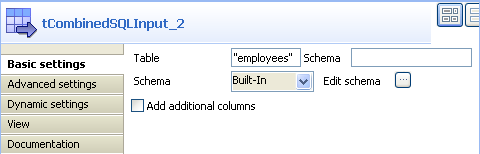
In the design workspace, select tCombinedSQLInput and click the Component tab to access the configuration panel.
-
Enter the source table name in the Table
field, and click the three-dot button next to Edit
schema to define the data structure.
Note
The schema defined through tCombinedSQLInput can
be different from that of the source table as you can just instantiate the desired
columns of the source table. Therefore, tCombinedSQLInput also plays a role of column filtering.
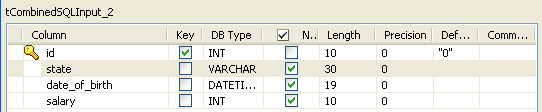
In this scenario, the source database table has seven columns: id,
first_name, last_name, city, state, date_of_birth, and
salary while tCombinedSQLInput
only instantiates four columns that are needed for the aggregation: id, state,
date_of_birth, and salary from the source
table.
-
In the design workspace, select tCombinedSQLFilter and click the Component tab to access the configuration panel.
-
Click the Sync columns button to retrieve the
schema from the previous component, or configure the schema manually by
selecting Built-in from the Schema list and clicking the […] button next to Edit
schema.
Note
When you define the data structure for tCombinedSQLFilter, column names automatically appear in the
Input column list in the Conditions table.
In this scenario, the tCombinedSQLFilter component
instantiates four columns: id, state, date_of_birth, and
salary.
-
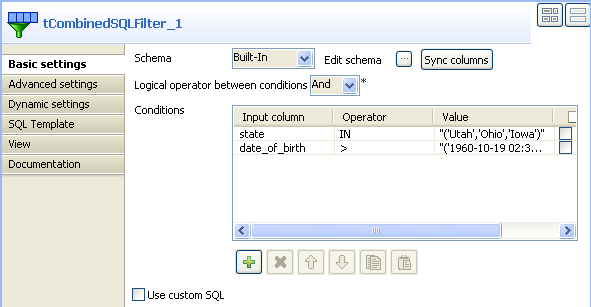
In the Conditions table, set input
parameters, operators and expected values in order to only extract the records
that fulfill these criteria.
In this scenario, the tCombinedSQLFilter component
filters the state and date_of_birth columns in
the source table to extract the employees who were born after Oct. 19, 1960 and who live
in the states Utah, Ohio and
Iowa.
-
Select And in the Logical operator between conditions list to apply the two
conditions at the same time. You can also customize the conditions by selecting
the Use custom SQL box and editing the
conditions in the code box. -
In the design workspace, select tCombinedSQLAggregate and click the Component tab to access the configuration panel.
-
Click the Sync columns button to retrieve the
schema from the previous component, or configure the schema manually by
selecting Built-in from the Schema list and clicking on the […] button.
The tCombinedSQLAggregate component instantiates four
columns: id, state, date_of_birth, and salary,
coming from the previous component.

The Group by table helps you define the data sets to
be processed based on a defined column. In this example:
State.
-
In the Group by table, click the [+] button to add one line.
-
In the Output column drop-down list, select
State. This column will be used to hold the data
filtered on State.
The Operations table helps you define the type of
aggregation operations to be performed. The Output
column list available depends on the schema you want to output (through
the tCombinedSQLOutput component). In this scenario, we
want to group employees based on the state they live. We want then count the number of
employees per state, calculate the average/lowest/highest salaries as well as the
oldest/youngest employees for each state.
-
In the Operations table, click the [+] button to add one line and then click in the
Output column list to select the output
column that will hold the computed data. -
In the Function field, select the relevant
operation to be carried out. -
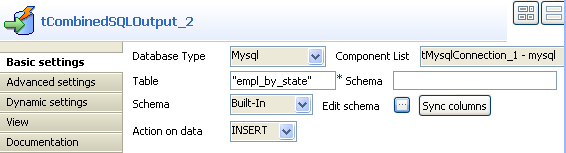
In the design workspace, select tCombinedSQLOutput and click the Component tab to access the configuration panel.
-
On the Database type list, select the
relevant database. -
On the Component list, select the relevant
database connection component if more than one connection is used. -
In the Table field, enter the name of the
target table which will store the results of the aggregation operations.
Note
In this example, the Schema field doesn’t need to
be filled out as the database is not Oracle.
-
Click the three-dot button next to Edit
schema to define the data structure of the target table.
In this scenario, tCombinedSQLOutput instantiates
seven columns coming from the previous component in the Job design (tCombinedSQLAggregate): state, empl_count,
avg_salary, min_salary, max_salary, oldest_empl and
youngest_empl.
-
In the design workspace, select tCombinedSQLCommit and click the Component tab to access the configuration panel.
-
On the Component list, select the relevant
database connection component if more than one connection is used. -
Save your Job and press F6 to execute
it.
Rows are inserted into a seven-column table empl_by_state in the
database. The table shows, per defined state, the number of employees, the average
salary, the lowest and highest salaries as well as the oldest and youngest
employees.
