Adding and linking components
-
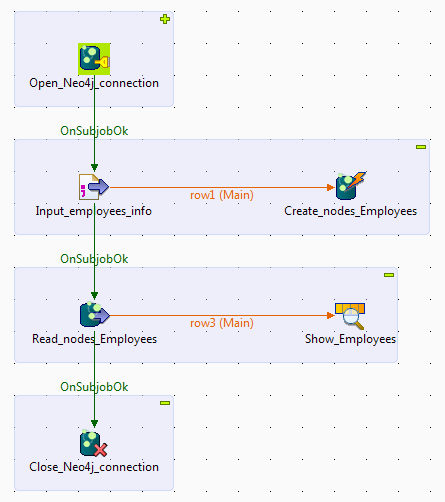
Create a Job and add the following components to the Job by typing theirs
names in the design workspace or dropping them from the Palette:-
a tNeo4jConnection component, to
open a connection to a Neo4j database, -
a tFileInputDelimited component,
to read the source data from a CSV file, -
a tNeo4jRow component, to write
the employees data to the Neo4j database with a Cypher query, -
a tNeo4jIntput component, to read
the employees data from the Neo4j database, -
a tLogRow component, to display
the data on the Run console,
and -
a tNeo4jClose component, to close
the Neo4j database connection opened by the tNeo4jConnection component.
-
-
Link the tNeo4jConnection component to
the tFileInputDelimited component using a
Trigger > On
Subjob Ok connection. -
Link the tFileInputDelimited component to
the tNeo4jRow component using a Row > Main
connection. -
Link the tFileInputDelimited component to
the tNeo4jIntput component using a
Trigger > On
Subjob Ok connection. -
Link the tNeo4jIntput component to the
tLogRow component using a Row > Main
connection. -
Link the tNeo4jIntput component to the
tNeo4jClose component using a Trigger > On Subjob
Ok connection. -
Label the components to better identify their roles in the Job.
Document get from Talend https://help.talend.com
Thank you for watching.
Subscribe
Login
0 Comments