Adding uniqueness constraints on the nodes
-
Double-click the tNeo4jBatchSchema component
to open its Component view.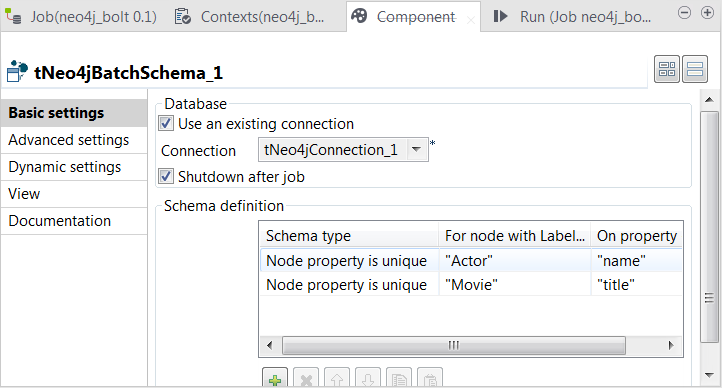
-
Select the Use an existing connection
check box to reuse the Neo4j database connection opened by the tNeo4jConnection component. - Select the Shutdown after Job check box to properly close the connection after the execution.
-
In the Schema definition table, add two rows by clicking the [+] button twice:
-
In the Schema type column, select
Node property is unique for both of the rows to
add uniqueness constraints to nodes in Neo4j. - In the For node with Label column, enter, within double quotation marks, Actor and Movie respectively, which are the labels used by the actor nodes and the movie nodes. Therefore, what you enter here must be identical with the labels previously used when creating those nodes.
-
In the On property column, enter, within double
quotation marks, the node properties to which you need to add uniqueness
constraints. For the actor nodes, enter name and
for the movie nodes, enter title. The values you
enter here must be identical with the column names previously defined to
provide actor names and movie names for the nodes to be created by the
tNeo4jBatchOutput components.
-
In the Schema type column, select
-
Press Ctrl+S to save the Job, and press
F6 or click Run on the Run tab to execute
the Job.
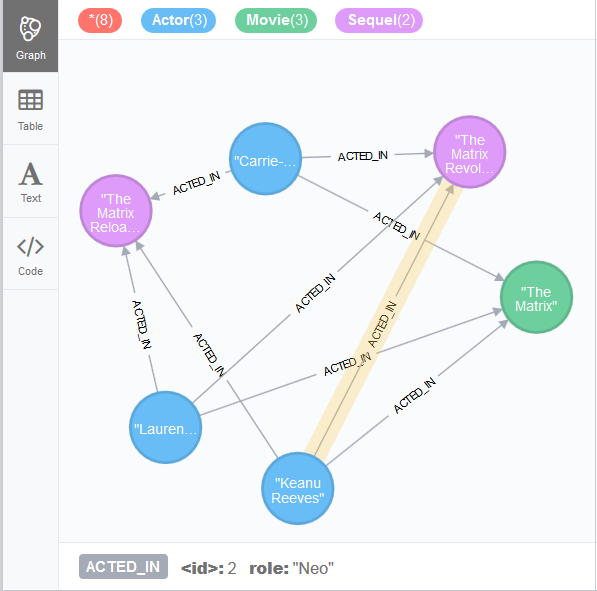
Once the Job runs successfully to the end, check the result in your Neo4j browser:
Document get from Talend https://help.talend.com
Thank you for watching.
Subscribe
Login
0 Comments