Classifying the output data with aggregate element
-
In your Studio, open the Job used in , and double-click
the tXMLMap component to open its Map Editor. -
Right-click the customer element in the output table and
select Remove group element from the contextual
menu. -
On the top of the output table, click the wrench icon and set the value of the
All in one property to false. -
Right-click the LabelState element and select
As aggregate element from the contextual menu.
The LabelState element tags the state information
of each customer and the customer information will be classified according to the
state information.To make the aggregate element available, ensure that the value of the
All in one property is set to false. For further information about the All in one feature, see
Talend Studio User Guide.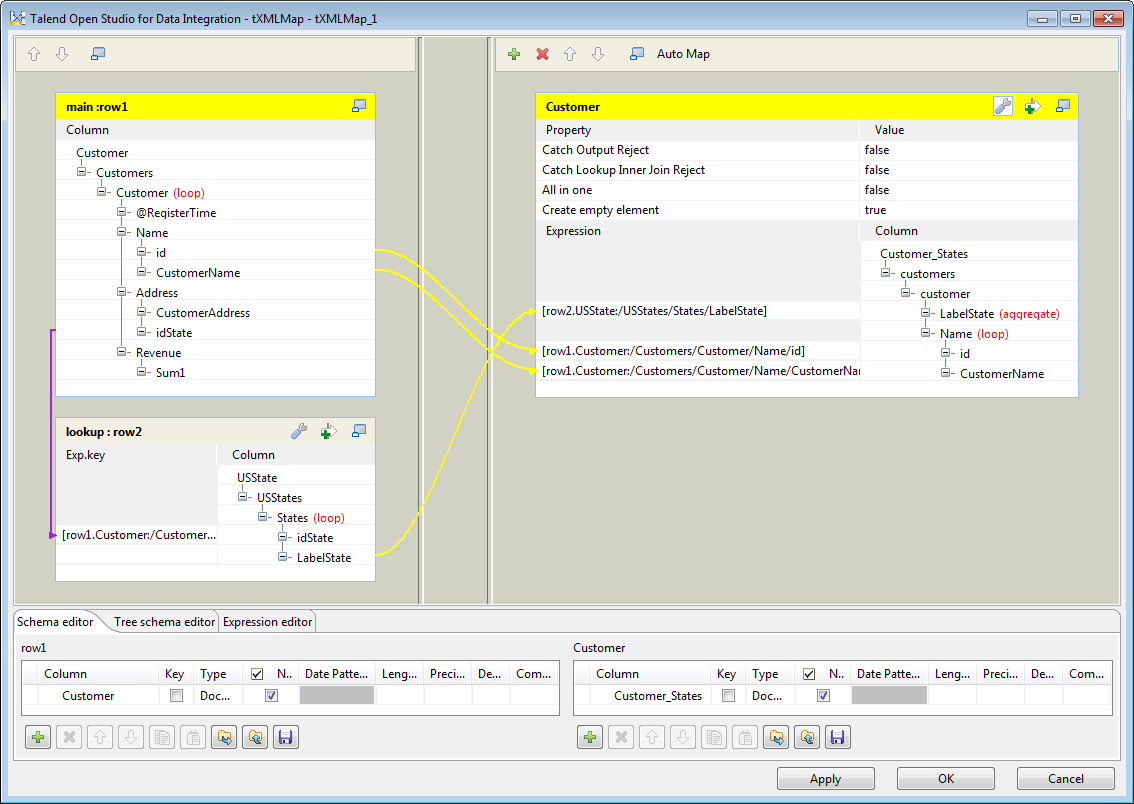
-
Click OK to validate the changes and close the
Map Editor. - Press Ctrl+S to save the Job and then F6 to run the Job.
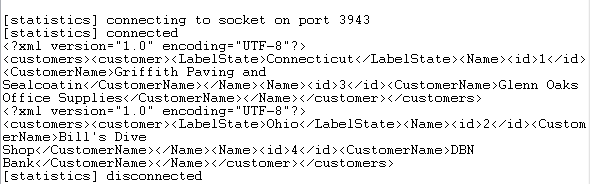
As shown above, tXMLMap outputs two separate XML flows,
each of which carries the information of one state and the customers from that state.
Document get from Talend https://help.talend.com
Thank you for watching.
Subscribe
Login
0 Comments