Configuring tHDFSInput
-
Double-click tHDFSInput to open its
Component view.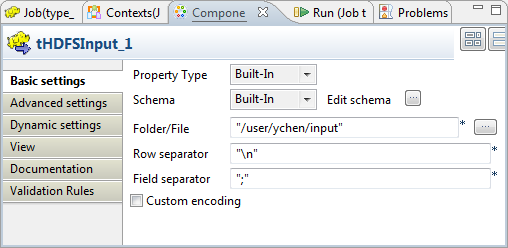
-
Click the

button next to Edit
schema to verify that the schema received in the earlier
steps is properly defined.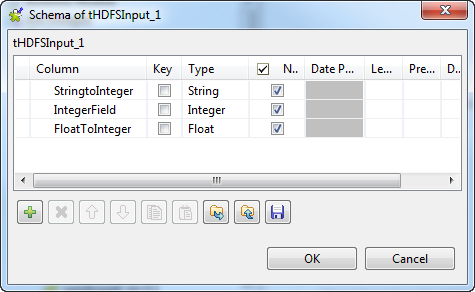 Note that if you are creating this Job from scratch, you need to click the
button to manually define the schema; otherwise, if the
schema has been defined in Repository, you
can select the Repository option from the
Schema list in the Basic settings view to reuse it. For further
information about how to define a schema in Repository, see the chapter describing metadata management
in the
Talend Studio User Guide or the chapter describing the
Hadoop cluster node in Repository of
Talend Open Studio for Big Data Getting Started
Guide
. -
If you make changes in the schema, click OK to validate these changes and accept the propagation
prompted by the pop-up dialog box. -
In the Folder/File field, enter the path,
or browse to the source file you need the Job to read.If this file is not in the HDFS system to be used, you have to place it in
that HDFS, for example, using tFileInputDelimited and tHDFSOutput in a Standard
Job.
Document get from Talend https://help.talend.com
Thank you for watching.
Subscribe
Login
0 Comments