Configuring the connection to the database
To configure the connection to the MySQL database of interest, proceed as
follows:
-
Double-click tMysqlConnection to open its
Component view.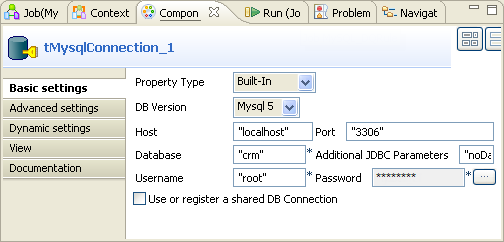
-
In the DB version field, select the
version of your MySQL database. It is Mysql
5 in this example. -
In the Host field, type in the server IP
address of the database to which you want to connect, localhost in this example. -
In the Port field, type in the port
number of the database to which you want to connect, 3306 in this example. -
In the Database field, enter the name of
the database in which you need to check the customer table, crm in this example. -
In the Username and the Password fields, enter the authentication
information to connect to the database of interest.
Document get from Talend https://help.talend.com
Thank you for watching.
Subscribe
Login
0 Comments