Configuring the input data and the structure mappings
-
Double-click the tFileInputDelimited
component to open its Basic settings
view.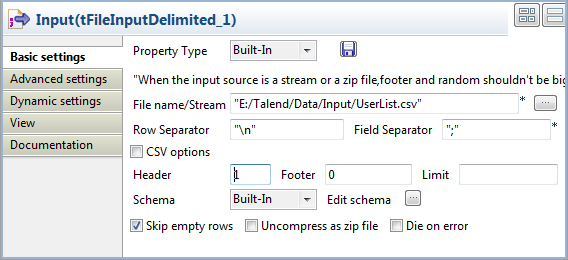
-
Specify the input file in the File name
field, fill the Header field with 1 to skip
the header row, and keep the rest parameters as they are. -
Click the […] button next to Edit schema to open the [Schema] dialog box, and edit the input schema as
follows:-
id, type Integer, 2 characters
long, set as the key column -
first_name, type String
-
last_name, type String
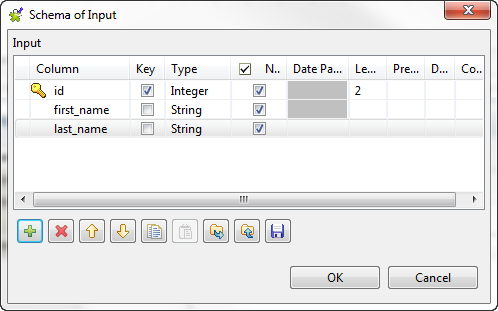
-
-
Double-click the tXMLMap component to
open the Map Editor. -
Rename the root node in the output
table: right-click the node, select Rename
from the contextual menu, and specify a new name in the pop-up dialog box,
user in this example. -
Select all the three columns in the input table and drop them onto the
user node, and select the Create as sub-element of target node option from
the pop-up dialog box to set these columns as sub-elements of the user node. When done, click OK to validate the mappings and close the Map
Editor.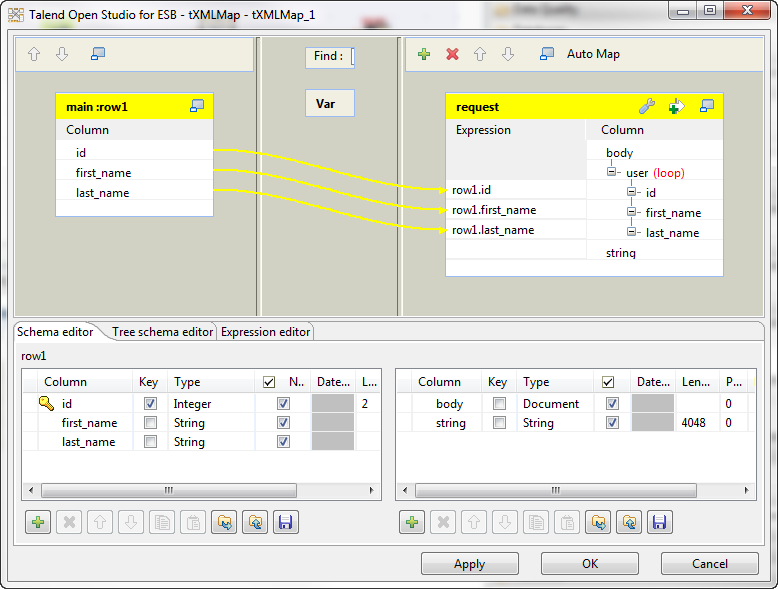
Document get from Talend https://help.talend.com
Thank you for watching.
Subscribe
Login
0 Comments