Configuring the service call
-
Double-click the tRESTClient component to
open its Basic settings view.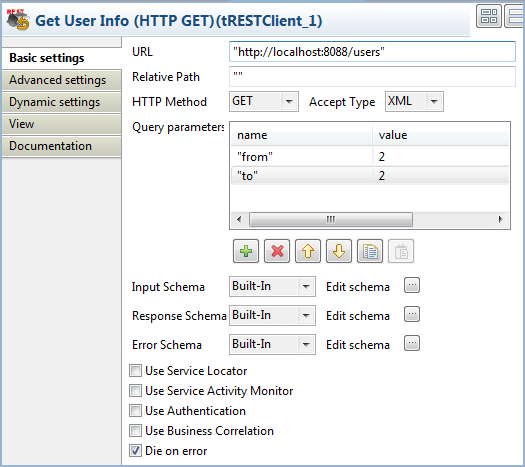
-
Fill the URL field with the URL of the
REST service you are going to invoke, “http://localhost:8088/users” in this example. Note that the
URL provided in this use case is for demonstration purposes only and not a
live address. -
From the HTTP Method list, select
GET to send an HTTP request for
retrieving the existing records.From the Accept Type list, select the
type the client end is prepared to accept for the response from the server
end, XML. Leave the rest of the settings as
they are. -
Click the [+] button beneath the
Query parameters table to add two
parameters, from and to, and set both parameters to 2, to get the information of the user with the
ID of 2.Alternatively, you can query the information of the user with the ID of 2
by adding ?from=2&to=2 to the service
URL. -
In the Advanced settings view of the
tRESTClient component, select the
Log messages and the Convert Response To DOM Document check boxes to
log the message exchange to the server and convert the response from the
server to document type.
Document get from Talend https://help.talend.com
Thank you for watching.
Subscribe
Login
0 Comments