Configuring the tJavaFlex and tJava components
-
Double-click the tJavaFlex component to open its
Basic settings view on the Component tab.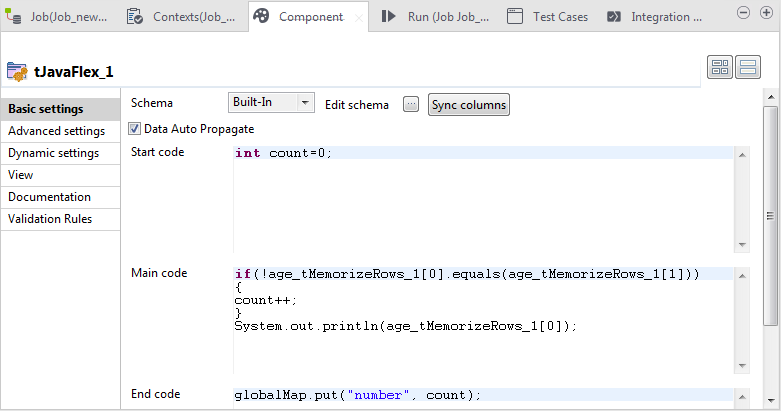
-
In the Start code area, enter the Java code that will
be called during the initialization phase. In this example, type inintin order to declare a variable count and assign the
count=0;
value 0 to it. -
In the Main code area, enter the Java code to be
applied to each row in the data flow. In this scenario, type
in:if(!age_tMemorizeRows_1[0].equals(age_tMemorizeRows_1[1]))This
{
count++;
}
System.out.println(age_tMemorizeRows_1[0]);
code compares two ages memorized by the tMemorizeRows
component each time and counts one change every time the ages are found to be different.
This code then displays the age that has been indexed as 0 by the tMemorizeRows component. When the tJavaFlex
component is in the same flow of the tMemorizeRows
component, the variable format isColumnName_ComponentName[index]. -
In the End code area, enter the Java code that will
be called during the closing phase. In this example, type inglobalMap.put("number",to initialize the global variable number with the value of the count
count);
variable. -
Double-click the tJava component to open its
Basic settings view on the Component tab.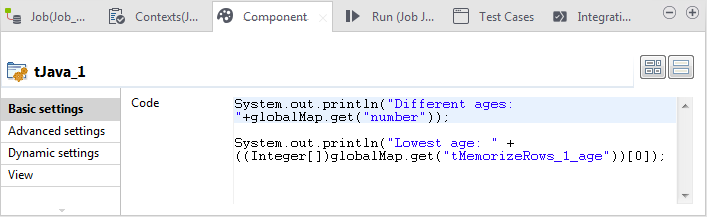
-
In the Code area, enter the flollowing code to
display the number of occurrences of different ages and the lowest age within the
customers on the
console:System.out.println("Different ages:
"+globalMap.get("number"));System.out.println("Lowest age: " + ((Integer[])globalMap.get("tMemorizeRows_1_age"))[0]);
The methodglobalMap.get()is used by the tJava to retrieve the array values. Note that here, the tJava is used outside the subjob tMemorizeRows so the variable format should be
ComponentName_ColumnName, which is different from the variable format used
by a component placed in the same flow.
Document get from Talend https://help.talend.com
Thank you for watching.
Subscribe
Login
0 Comments