Configuring the tSAPBapi component
-
Double-click tSAPBapi to open its
Basic settings view on the Component tab.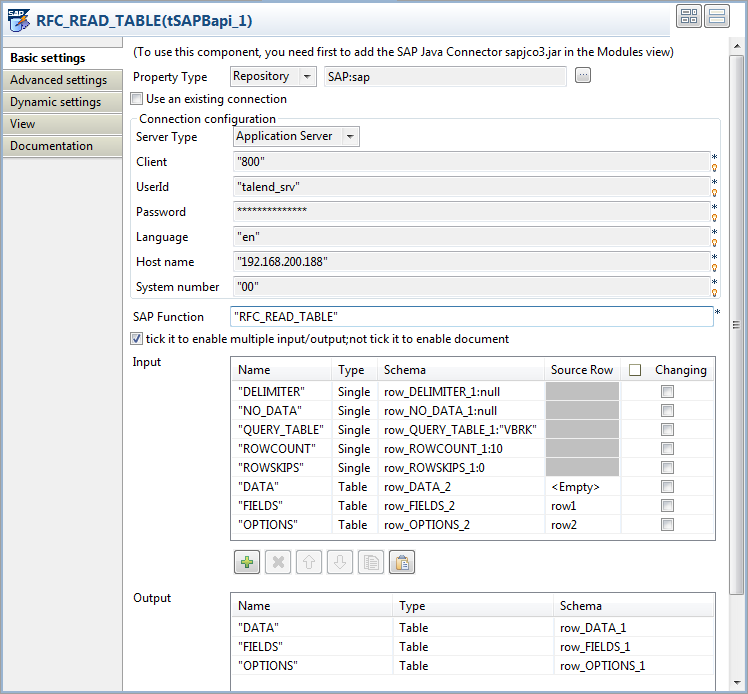 The SAP Function field has already been
filled automatically with the name of the function to be called. In this
example, it is RFC_READ_TABLE.The Input and Output tables have already been filled automatically with
the input and output schemas of the function RFC_READ_TABLE. -
In the Input table, click in the Schema field for the QUERY_TABLE input parameter and click the […] button in the cell. In the pop-up dialog
box, enter the value for the QUERY_TABLE
input parameter between double quotation marks in the Value column. In this example, the table to be queried is
VBRK.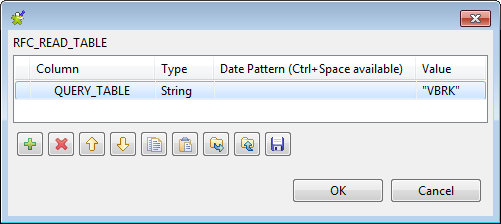
-
Do the same to set the value for the ROWCOUNT and ROWSKIPS
input parameters to 10 and 0 respectively. - Click in the Source Row field for the FIELDS input parameter and select row1 from the drop-down list.
- Do the same to select row2 for the OPTIONS input parameter.
Document get from Talend https://help.talend.com
Thank you for watching.
Subscribe
Login
0 Comments