Configuring the Web service via the tSOAP component
-
Double-click the tSOAP component to open its
Basic settings view.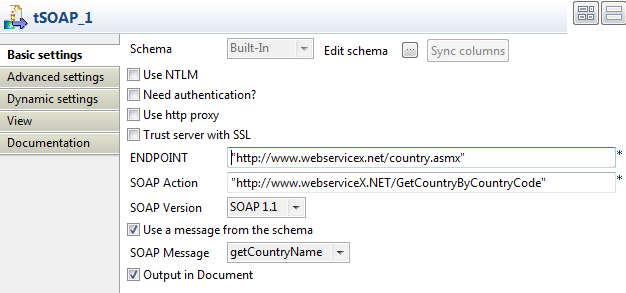
-
In ENDPOINT field, enter or copy-paste the URL
address of the Web service to be used between the quotation marks:
“http://www.webservicex.net/country.asmx”. -
In the SOAP Action field, enter or copy-paste
the URL address of the SOAPAction HTTP header field that indicates that you want
to retrieve the country name information:
http://www.webserviceX.NET/GetCountryByCountryCode. -
Select the Use a message from the schema check
box, and select a Document type column from the
SOAP Message list to read the SOAP message
from the input file to send to the Web service. In this example, the input schema
has only one column, getCountryName. -
Select the Output in Document check box to
output the response message in XML format.
Document get from Talend https://help.talend.com
Thank you for watching.
Subscribe
Login
0 Comments