Copying the uploaded object to another Amazon S3 bucket
-
Double-click the tS3Copy
component to open its Basic
settings view on the Component tab.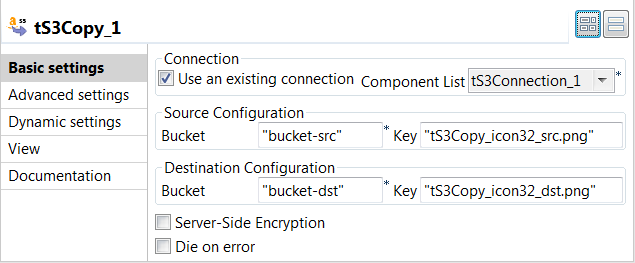
-
Select the Use an existing
connection check box to reuse the Amazon
S3 connection information you have defined in the tS3Connection
component. -
In the Bucket field in the
Source
Configuration area, enter the name of the
bucket which contains the object to be copied. In this
example, it is bucket-src. -
In the Key field in the
Source
Configuration area, enter the key of the
object to be copied. In this example, it is tS3Copy_icon32_src.png. -
In the Bucket field in the
Destination
Configuration area, enter the name of the
bucket to which the object will be copied. In this example,
it is the empty one bucket-dst that already exists in Amazon
S3. -
In the Key field in the
Destination
Configuration area, enter the new key for
the object after being copied to the destination bucket. In
this example, it is tS3Copy_icon32_dst.png.
Document get from Talend https://help.talend.com
Thank you for watching.
Subscribe
Login
0 Comments