Create connections and subscribers
-
In the Repository tree view and under
Metadata, create a connection to your
database dedicated to CDC, in this scenario
CDC_connection.Note:Ensure that the database connection for CDC is on the same server with
the source data to which changes are to be captured. -
In the Repository tree view and under
Metadata, create a connection to the
source data warehouse and identify the table to catch, in this scenario
CRM_connection. -
Right-click the CRM connection and select Retrieve schema from the drop-down menu to
retrieve the schema of the table to catch. -
Right-click CDC Foundation of
CRM and select Create
CDC in the drop-down menu.The [Create Change Data Capture] dialog
box displays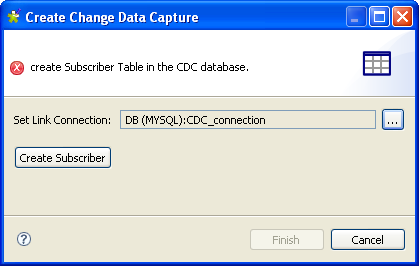
-
In the Set link Connection field, select
CDC_connection. -
Click Create Subscriber. The [Create Subscriber and Execute SQL Script] dialog
box displays.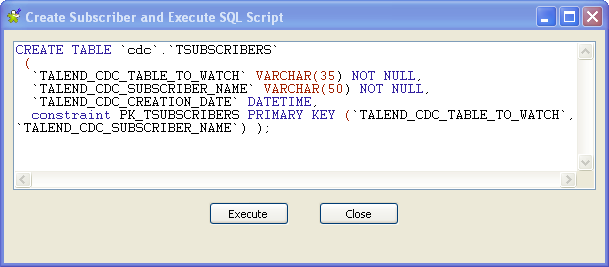
- Click Execute and then Close.
-
Click Finish to validate the creation of
the subscriber table.In the CDC Foundation folder, the
relevant subscriber table displays.
Document get from Talend https://help.talend.com
Thank you for watching.
Subscribe
Login
0 Comments