Creating a Job for aggregating Snowflake data
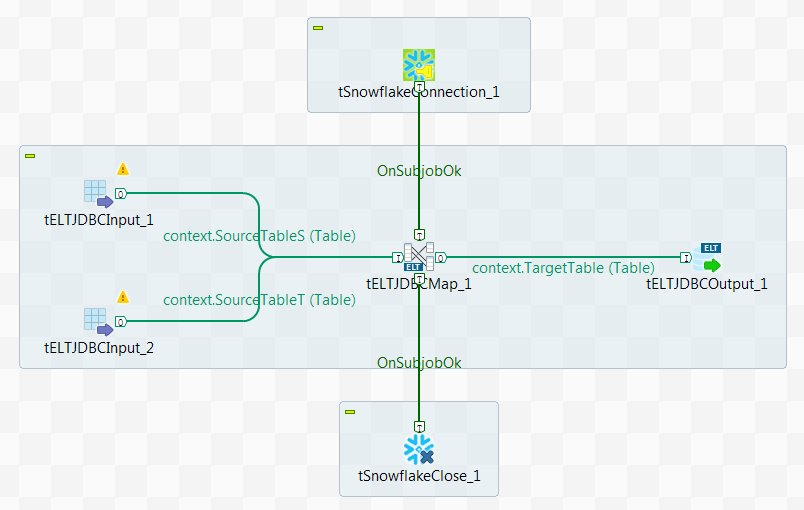
-
A new Job has been created and the context variables
SourceTableS with the value
STUDENT, SourceTableT with
the value TEACHER, and
TargetTable with the value
FULLINFO have been added to the Job. For more
information about how to use context variables, see the related
documentation about using contexts and variables. -
The source table STUDENT with three columns,
SID and TID of
NUMBER(38,0) type and SNAME of VARCHAR(50) type, has
been created in Snowflake, and the following data has been written into the
table.12345678910#SID;SNAME;TID11;Alex;2212;Mark;2313;Stephane;2114;Cedric;2215;Bill;2116;Jack;2317;John;2218;Andrew;23 -
The source table TEACHER with three columns,
TID of NUMBER(38,0) type and
TNAME and TPHONE of
VARCHAR(50) type, has been created in Snowflake, and the following data has
been written into the table.12345#TID;TNAME;TPHONE21;Peter;+86 1581234345622;Michael;+86 1317896453223;Candice;+86 13923187456
-
Add a tSnowflakeConnection component, a
tSnowflakeClose component, two
tELTJDBCInput components, a
tELTJDBCMap component, and a
tELTJDBCOutput component to your Job. -
On the Basic setting view of the first
tELTJDBCInput component, enter the name of the first
source table in the Default Table Name field. In this
example, it is the context variable
context.SourceTableS.
-
Do the same to set the value of the default table name for the second
tELTJDBCInput component and the
tELTJDBCOutput component to
context.SourceTableT and
context.TargetTable respectively. -
Link the first tELTJDBCInput component to the
tELTJDBCMap component using the Link > context.SourceTableS (Table) connection. -
Link the second tELTJDBCInput component to the
tELTJDBCMap component using the Link > context.SourceTableT (Table) connection. -
Link the tELTJDBCMap component to the
tELTJDBCOutput component using the Link > *New Output* (Table) connection. The link will be renamed automatically to
context.TargetTable (Table). -
Link the tSnowflakeConnection component to the
tELTJDBCMap component using a Trigger > On Subjob Ok connection. -
Do the same to link the tELTJDBCMap component to the
tSnowflakeClose component.