Creating a Job for delivering Amazon SQS messages
Create a Job to open a connection to access Amazon SQS, then create
an Amazon SQS queue, finally deliver a couple of messages to the queue.
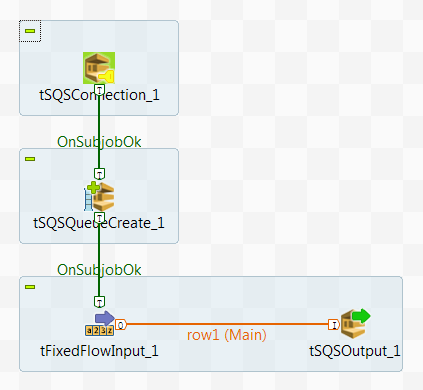
-
Create a new Job and add a tSQSConnection component, a tSQSQueueCreate component, a tFixedFlowInput component, and a tSQSOutput component by typing their names in the design workspace
or dropping them from the Palette. -
Link the tFixedFlowInput component to
the tSQSOutput component using a Row > Main
connection. -
Link the tSQSConnection component to
the tSQSQueueCreate component using a Trigger > OnSubjobOk
connection. -
Link the tSQSQueueCreate component to
the tFixedFlowInput component using a Trigger > OnSubjobOk
connection.
Document get from Talend https://help.talend.com
Thank you for watching.
Subscribe
Login
0 Comments