Creating a table in HDFS
-
Double-click tHCatalogOperation to open
its Basic settings view.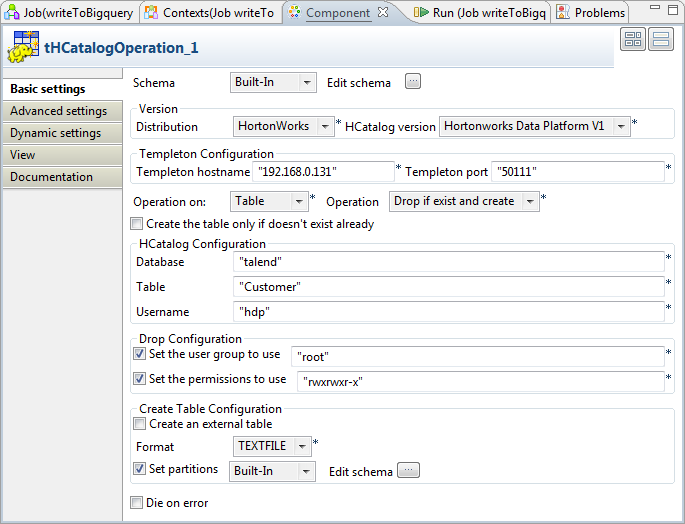
-
Click Edit schema to define the schema
for the table to be created.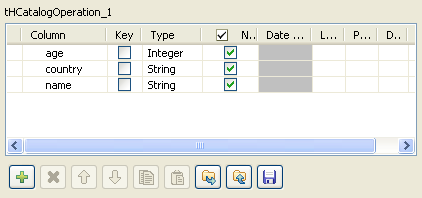
-
Click [+] to add at least one column to
the schema and click OK when you finish
setting the schema. In this scenario, the columns added to the schema are:
name, country and age. -
Fill the Templeton hostname field with
URL of the Templeton webservice you are using. In this scenario, fill this
field with “192.168.0.131“. -
Fill the Templeton port field with the
port for Templeton hostname. By default,
the value for this field is “50111“ -
Select Table from the Operation on list and Drop
if exist and create from the Operation list to create a table in HDFS. -
Fill the Database field with an existing
database name in HDFS. In this scenario, the database name is “talend“. -
Fill the Table field with the name of the
table to be created. In this scenario, the table name is “Customer“. -
Fill the Username field with the username
for the DB authentication. -
Select the Set the user group to use
check box to specify the user group. The default user group is “root“, you need to specify the value for this
field according to real practice. -
Select the Set the permissions to use
check box to specify the user permission. The default value for this field
is “rwxrwxr-x“. -
Select the Set partitions check box to
enable the partition schema. -
Click the Edit schema button next to
the Set partitions check box to define
the partition schema. -
Click [+] to add one column to the schema
and click OK when you finish setting the
schema. In this scenario, the column added to the partition schema is:
match_age.
Document get from Talend https://help.talend.com
Thank you for watching.
Subscribe
Login
0 Comments