Creating actor-movie relationship in Neo4j
-
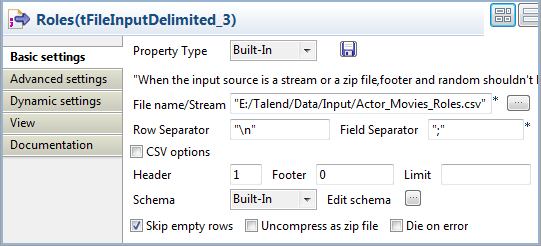
Double-click the third tFileInputDelimited component to open its Basic settings view on the Component tab.
-
In the File name/Stream field, specify
the path to the CSV file that describes the actors’ roles in the
movies.The input CSV file used in this example is as follows:12345678910Actor;Movie;RoleKeanu Reeves;The Matrix;NeoKeanu Reeves;The Matrix Reloaded;NeoKeanu Reeves;The Matrix Revolutions;NeoLaurence Fishburne;The Matrix;MorpheusLaurence Fishburne;The Matrix Reloaded;MorpheusLaurence Fishburne;The Matrix Revolutions;MorpheusCarrie-Anne Moss;The Matrix;TrinityCarrie-Anne Moss;The Matrix Reloaded;TrinityCarrie-Anne Moss;The Matrix Revolutions;Trinity -
In the Header field, specify the number
of rows to skip as header rows. In this example, the first row of the CSV
file is the header row. -
Click the […] button next to Edit schema to open the [Schema] dialog box, and define the input schema based on
the structure of the input file. In this example, the input schema is
composed of three columns, actor,
movie, and role, all of type String.When done, click OK to close the
[Schema] dialog box and propagate the
schema to the next component. -
Double-click the tNeo4jOutputRelationship
component to open its Basic settings
view.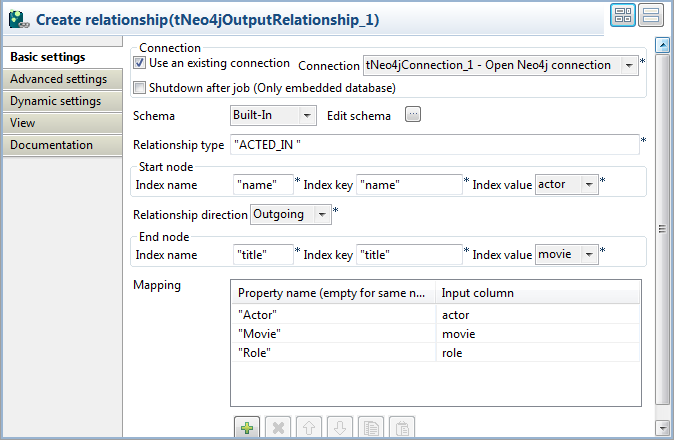
-
Select the Use an existing connection
check box to reuse the Neo4j database connection opened by the tNeo4jConnection component, which is the only
connection component used in this example. -
In the Relationship type field, enter the
type of relationship to be created, between double quotation marks. In this
example, the relationship type is ACTED_IN, which will appear as the label of the relationship
between nodes. -
Define the start and end nodes and the direction of the relationship to be
created. In this example, the relationship will be created from Actors nodes, on which an index called
name has been defined, to Movies nodes, on which an index called
title has been defined.-
Start node: enter name between double quotation marks in
the Index name and Index key fields, and select the schema
column name from the Index value list. As the Value field is left blank in index
creation, the index value will be the value of column name for each row. -
From the Relationship direction
list, select Outgoing. -
End node: enter title between double quotation marks in
the Index name and Index key fields, and select the schema
column title from the Index value list. As the Value field is left blank in index
creation, the index value will be the value of column title for each row.
-
-
Click the [+] button
three times to add three rows in the Mapping table to define three properties of the relationship:Property
Value taken from…
Actor
actor column of the schema
Movie
movie column of the schema
Role
role column of the schema