Creating sample stewardship tasks
The first part of this scenario creates the sample data and data stewardship
tasks.
- Drop a tFixedFlowInput component from the Palette onto the workspace, and rename it SampleData.
-
In the Component view of tFixedFlowInput component called SampleData, click the Edit schema button.
In the schema that opens, create the columns shown below and set the appropriate Type for each column.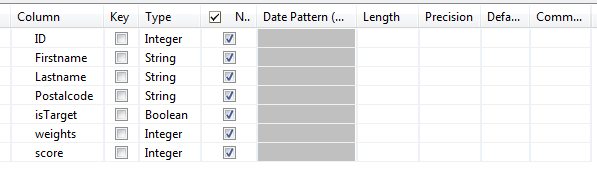
-
Select Use Inline Table and enter some data in each
of the columns, as in the example below.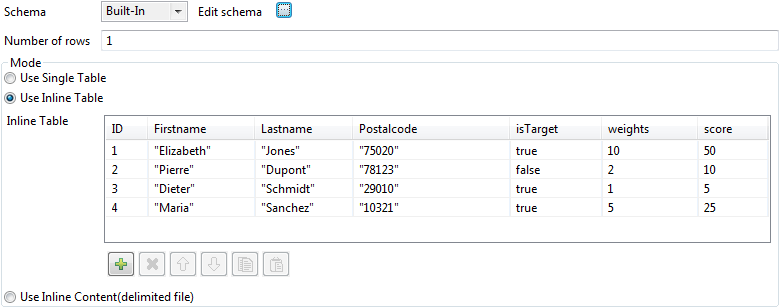
-
Drop a tStewardshipTaskOutput component onto the
workspace, and rename it CreateStewardshipTasks.The tStewardshipTaskOutput component creates tasks in
the
Talend Data Stewardship Console
database and lists these tasks in the
Talend Data Stewardship Console
. -
Connect the tFixedFlowInput component called
SampleData to the tStewardshipTaskOutput component called CreateStewardshipTasks using a Row Main
link. -
In the Component view of tStewardshipTaskOutput component called CreateStewardshipTasks, in the Basic
settings tab, provide the connection information (Url, User name and Password) for the Data Stewardship Console to which you want to connect, and
the information about the tasks you want to create, as shown in the following example.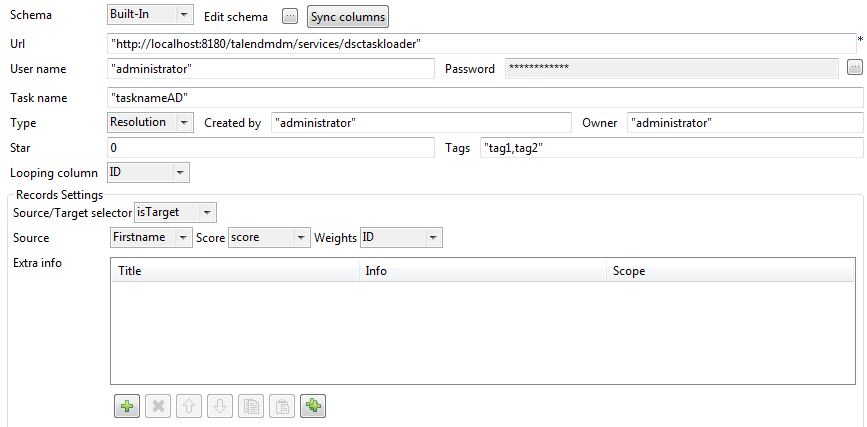
-
Run your Job and then open the Data Stewardship Console to check that your tasks have
been created.
Document get from Talend https://help.talend.com
Thank you for watching.
Subscribe
Login
0 Comments