Delivering messages to the Amazon SQS queue
Configure the tFixedFlowInput
component and the tSQSOutput component to deliver
messages to the new empty Amazon SQS queue.
component and the tSQSOutput component to deliver
messages to the new empty Amazon SQS queue.
-
Double-click the tSQSOutput component
to open its Basic settings view.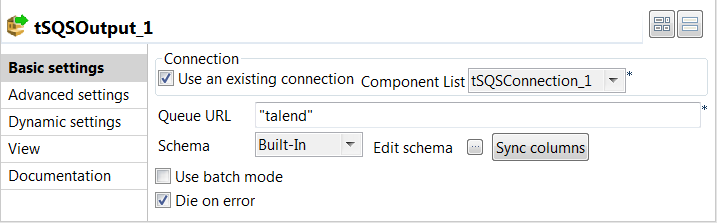
-
Specify the connection details required to access Amazon SQS. In this
example, select the Use an existing connection
check box and from the Component List drop-down
list displayed, select the connection component to reuse its connection details you
have already defined. -
In the Queue URL field, enter the name
for the queue to which the messages will be delivered. In this example, it is
talend. -
Click the

button next to Edit schema to
open the schema dialog box.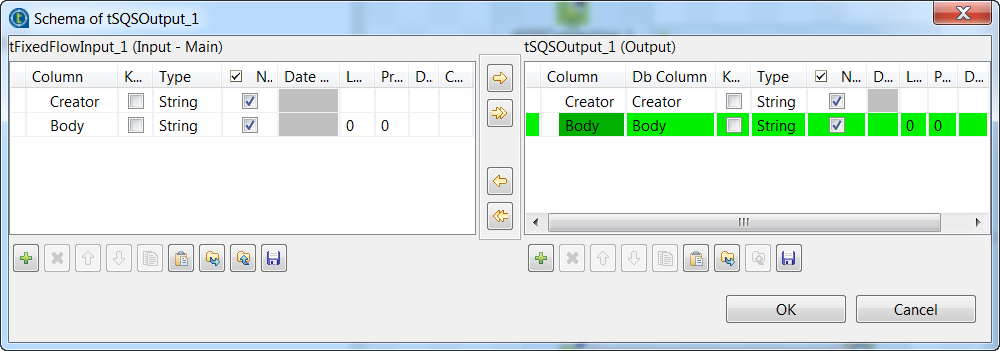 You can see the schema of the tSQSOutput
component is predefined with a single String column Body that stores the body of each message to be delivered. -
Click the

button in the right panel to add one column
Creator of String type, which will hold the customized
creator attribute value of each message. -
Click the

button to copy all columns from the output schema to the input
schema. In the pop-up dialog box, click OK to
accept the changes. -
Click OK to close the schema dialog
box. -
Double-click the tFixedFlowInput
component to open its Basic settings view.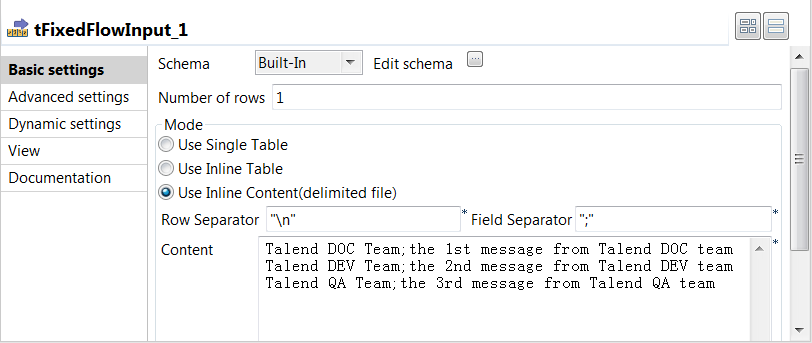
-
In the Mode area, select Use Inline Content(delimited file). Then in the Content field displayed, enter the creator attribute and
body data of the messages to be delivered to Amazon SQS. In this example, it
is:123Talend DOC Team;the 1st message from Talend DOC teamTalend DEV Team;the 2nd message from Talend DEV teamTalend QA Team;the 3rd message from Talend QA team
Document get from Talend https://help.talend.com
Thank you for watching.
Subscribe
Login
0 Comments