Designing the Job and configuring the input data
- Drop a tFixedFlowInput and two tLogRow components from the Palette to the design workspace.
-
From the Embedded Rules node in the
Repository tree view, drop the rule
template you created.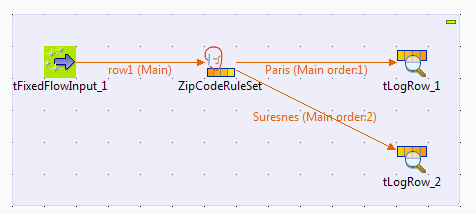 A tRules component with the embedded rule
template is displayed on the workspace. -
Link tFixedFlowInput to tRule using a Row >
Main link. -
Double-click tFileInputDelimited to
display its Basic settings view and define
the component properties.
-
Click the […] button next to Edit schema to open the schema editor.

-
Add two rows using the [+] button, name
the rows as zipCode and CityName
and click OK.When you define the DRL rules, you will use the
zipCode column to match the city zip codes and the
CityName column to output the name of the city that
match the zip code.Note:Make sure to start the column name you will use to match the zip code
with lower case, otherwise you will get an error when trying to run the
Job. - In the Mode area, select the Use Inline Content (delimited file).
-
Set the row and field separators, and in the Content table, type in the delimited data on which to apply
the DRL rules.
Document get from Talend https://help.talend.com
Thank you for watching.
Subscribe
Login
0 Comments