Dropping and linking components
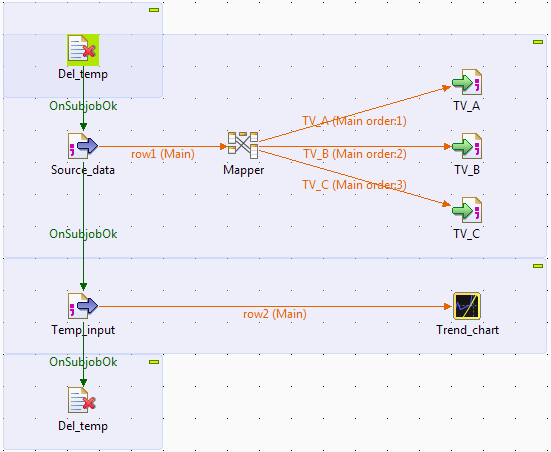
- Drop the following components from the Palette to the design workspace: two tFileDelete components, two tFileInputDelimited components, a tMap, three tFileOutputDelimited components, and a tLineChart.
-
Connect the first tFileInputDelimited to
the tMap component using a Row > Main
connection. -
Connect the tMap component to the first
tFileOutputDelimited component using a
Row > Main connection, and name the connection TV_A. -
Repeat the step above to connect the tMap
component to the other two tFileOutputDelimited components using Row > Main connections, and
name the connections TV_B and TV_C respectively. -
Connect the section tFileInputDelimited
to the tLineChart component using a
Row > Main connection. When questioned whether to get the schema
from the target component, click Yes. -
Connect the first tFileInputDelimited
component to the second tFileInputDelimited
component using a Trigger > On Subjob Ok connection. -
Connect the first tFileDelete component
to the first tFileInputDelimited component,
and then the second tFileInputDelimited
component to the second tFileDelete
component, using Trigger > On Subjob Ok connections. - Relabel the components to best describe their functionality.
Document get from Talend https://help.talend.com
Thank you for watching.
Subscribe
Login
0 Comments