Evaluating and generating a classification model
The tNLPModel component reads training data in CoNLL format to
evaluate and generate a classification model.
evaluate and generate a classification model.
-
Double click the tNLPModel component to open its
Basic settings view and define its properties.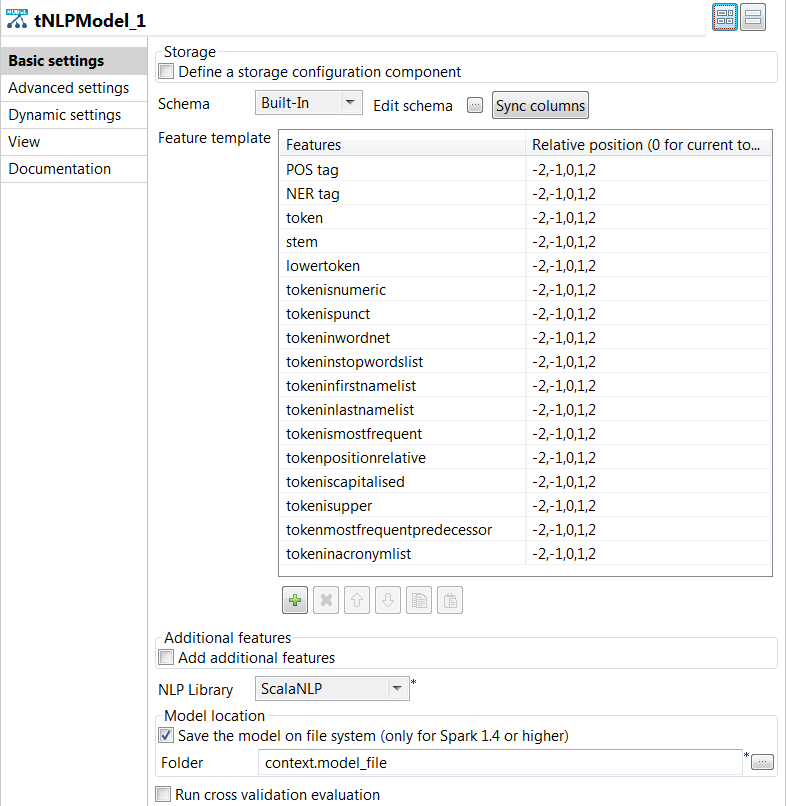
-
Click the [+] button under the
Feature template table to add rows to the
table. -
Click in the Features column to select the
features to be generated. -
For each feature, specify the relative position.
For example -2,-1,0,1,2 means that you use the
current token, the preceding two and the following two context
tokens as features. -
From the NLP Library list, select the same
library you used for preprocessing the training text data.
-
Click the [+] button under the
-
To evaluate the model, select the Run cross validation
evaluation check box and enter 2 in the
Fold field.This means the training data is partitioned into two pieces: the training
data set and the test data set. The validation process is repeated
twice. -
Press F6 to save and execute the
Job.
The results from the K-fold cross-validation process are displayed on the
Run view:-
Precisionis the ratio of correctly predicted named
entities to the total number of predicted named entities. -
Recallis the ratio of correctly predicted named
entities to the total number of named entities. -
F1 scoreis the harmonic mean between
recallandprecision.
-
-
Clear the Run cross validation evaluation check
box. -
Select the Save the model on file system check box to
save the model locally in the folder specified in the
Folder field. -
Press F6 to save and execute the
Job.
The model files are stored in the specified folder. You can now use the generated
model with the tNLPPredict component to predict named entities
and label text data automatically.
Document get from Talend https://help.talend.com
Thank you for watching.
Subscribe
Login
0 Comments