Executing the Job and showing the results on the console
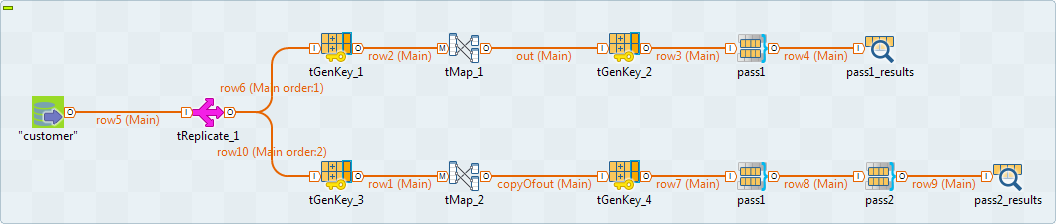
In order to show the match groups created after the first pass and compare
them with the groups created after the second pass, you must modify the Job as
the following:
them with the groups created after the second pass, you must modify the Job as
the following:
-
-
Use a tReplicate component to
replicate the input flow you want to process as shown in the above
figure. Use a copy/paste operation to create the two parts of the
Job. -
Keep only the first pass,tMatchGroup component, in the upper part of the Job
and show the match results in a tLogRow component. -
Use two passes in the lower part of the Job and show the final
match results in a tLogRow
component.
-
Double-click each of the tLogRow
components to open the Component view and
in the Mode area, select the Table (print values in cells of a table)
option. -
Save your Job and press F6 to execute
it.The results after the first pass read as follows: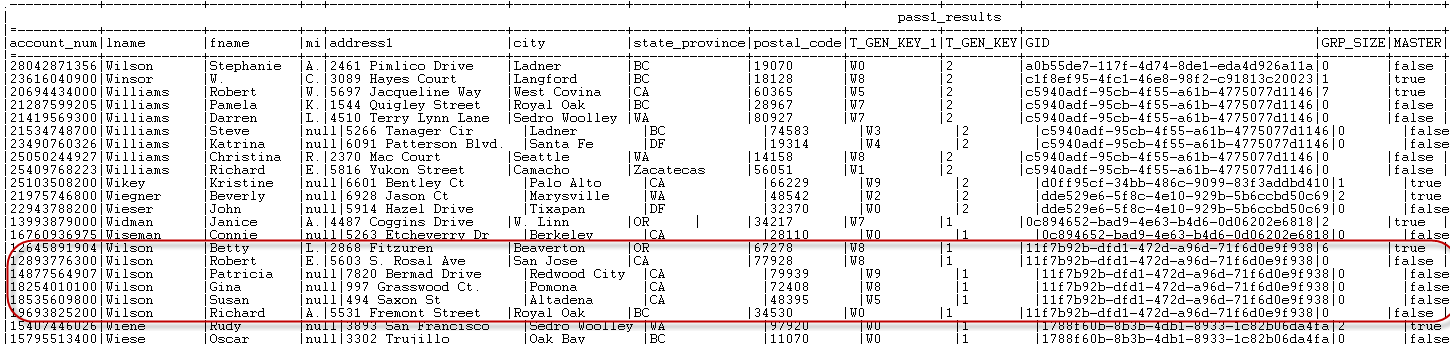 The results after the second pass read as follows:
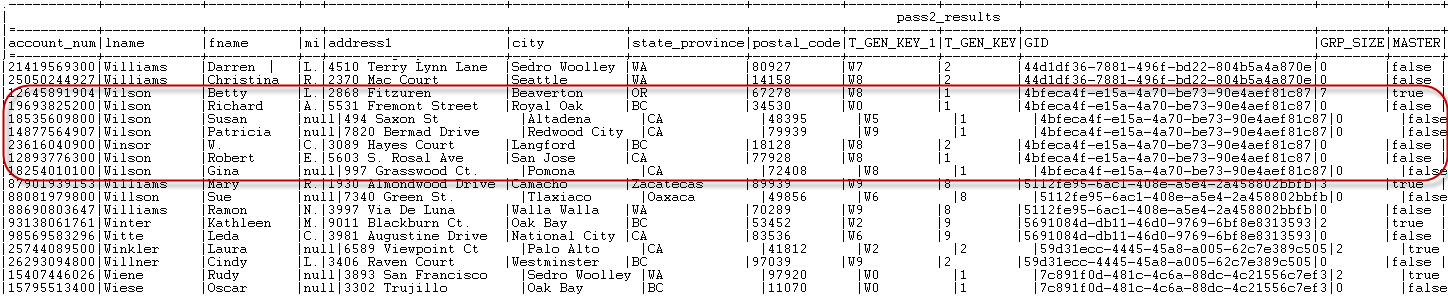 When you compare, for example, the customer name Wilson from the results of the two passes, you will find
that more customers using the last name Wilson are grouped together after the second pass.
Document get from Talend https://help.talend.com
Thank you for watching.
Subscribe
Login
0 Comments