Extracting change data
After setting up the CDC environment, you can now design a job using the Mysql CDC
component to incrementally extract the change data from the
Leadfact table. To do that:
- From the Palette, drop the tMysqlCDC and tLogRow components to the design workspace.
-
Link the two components using a Row Main
link.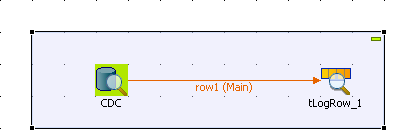
-
Double-click the tMysqlCDC component to
define its properties.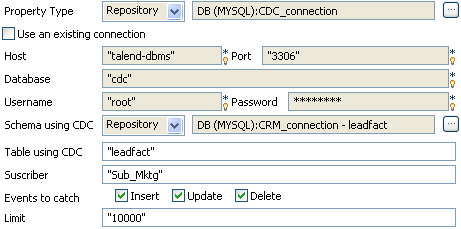
-
Set Property Type to Repository and then select the select the schema
corresponding to your Mysql database table,
CDC_connection in this scenario. The connection
details will display automatically in the corresponding fieldsNote:If you have not stored the CRM data warehouse connection details in
the Metadata entry in the Repository,
select Built-in in the property type
list and set the connection details manually. -
In the Schema using CDC field, select
Repository and then select the schema
of the Leadfact table stored in the Metadata entry. -
In the Table using CDC field, enter the
name of the table captured by the CDC, in this scenario
Leadfact. -
In the Subscriber field, enter the name
of the subscriber that will extract modified data,
Sub_Mktg,
Sub_Sales, and Sub_Finance for the
Marketing, Sales and Treasury Departments respectively. -
In the Events to catch field, select the
check boxes corresponding to the type of the modified data the subscriber
will extract. In this scenario, select the three check boxes for the three
subscribers. -
Double-click the tLogRow component to
set is properties.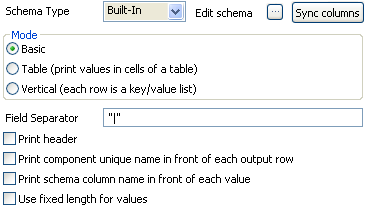
-
Click the Sync columns button to
retrieve the schema from the preceding component. -
Save your job and press F6 to execute
it.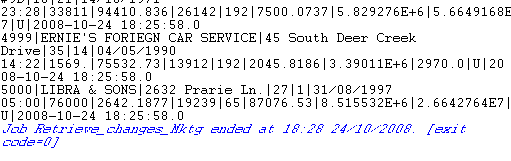
The customer names are converted to upper case and the modification type displays
here is U to stand for Update.
Once these modifications are extracted, they are no more available in the modified
table. To verify their extraction, right-click the Leadfact
table catched by the CDC and then select Views All
Changes. The extracted changes do not display anymore.