Generating the trigger to invoke the Job created
Deploying the Job to be deployed onto the MDM server
-
Switch to the MDM
perspective, and expand the Job Designs
node in the MDM Repository tree view. -
Right-click the Job update_product
created previously in this scenario, and select Deploy To… from the contextual menu.The deployment wizard is displayed. -
From the server list, select the MDM server you are using,
and then click OK. -
In the Deploy to Talend
MDM window that pops up, keep the default settings:
Export type is Hosted (zip) and Context scripts is Default.You can see more information about these
settings on Talend Help Center (https://help.talend.com). -
Click Finish to
validate these settings and start the deployment.When the deployment is done, a message box pops up to indicate that the
deployment is successful. -
Click OK to close
this message box.A window pops up to indicate that the Job
update_product is deployed
successfully. -
Click OK to finalize
the deployment.
Generating the trigger used to call the Job
-
Right-click the Job update_product
and select Generate Talend Job Caller
Trigger from the contextual menu. -
In the pop-up window, keep the default settings for this
scenario: Integrated and Embedded.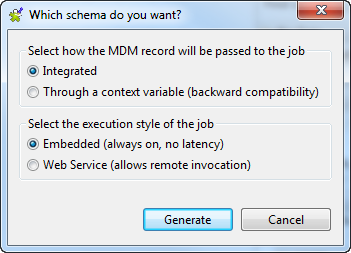
-
Click Generate to
start the generation.Once done, a trigger named
CallJob_update_product is displayed under the
Trigger node in MDM
Repository. -
Right-click this trigger, and then select Deploy To… from the contextual menu to
deploy it onto the MDM server. -
In the pop-up wizard, select the server you are using, and
click OK. -
Click OK to finalize
the deployment.
Document get from Talend https://help.talend.com
Thank you for watching.
Subscribe
Login
0 Comments