Joining the data
-
Double-click tMap to open its
Map editor.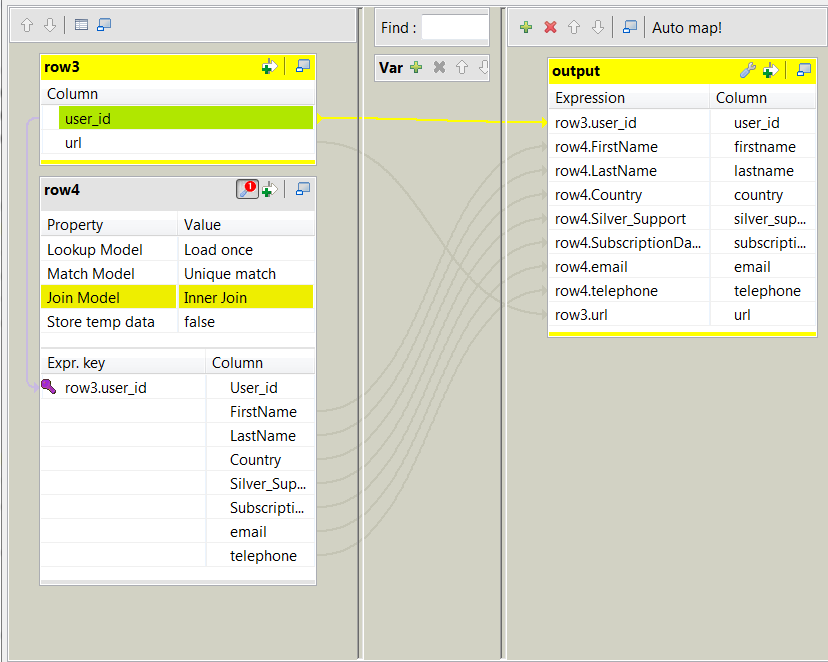 On the input side (the left side), the main flow (labeled row3 in this example) and the lookup flow (labeled
row4 in this example) are presented as two
tables.On the output side (the right side), an empty table is present. -
Drop all of the columns of the schema of the lookup flow into the output flow
table on the right side, except the User_id
column, and drop the user_id column and the
url column from schema of the main flow into
the same output flow table. -
On the left side, drop the user_id column
from the main flow table into the Expr.key
column in the User_id row in the lookup flow
table. This makes the ID numbers of the customers the key for the join of the
two input flows. -
In the lookup flow table, click the wrench icon to display the panel for the
lookup settings and select Inner Join for the
Join model property. -
Click Apply to validate these changes and
click OK to close this editor.
Document get from Talend https://help.talend.com
Thank you for watching.
Subscribe
Login
0 Comments